

PERMISSIONS & AUDIT TRAIL
Permissions and audit trail for skills, prompts, MCPs, secrets, and agents
Enterprise AI governance talk often stays at policy level. Ops still needs concrete controls on the assets people run: who can view, use, or manage a prompt or skill; folder bulk permissions; and a central audit trail. Joyst gives you those productised controls on the AI asset layer — not a generic GRC suite, and not IDP scorecards.
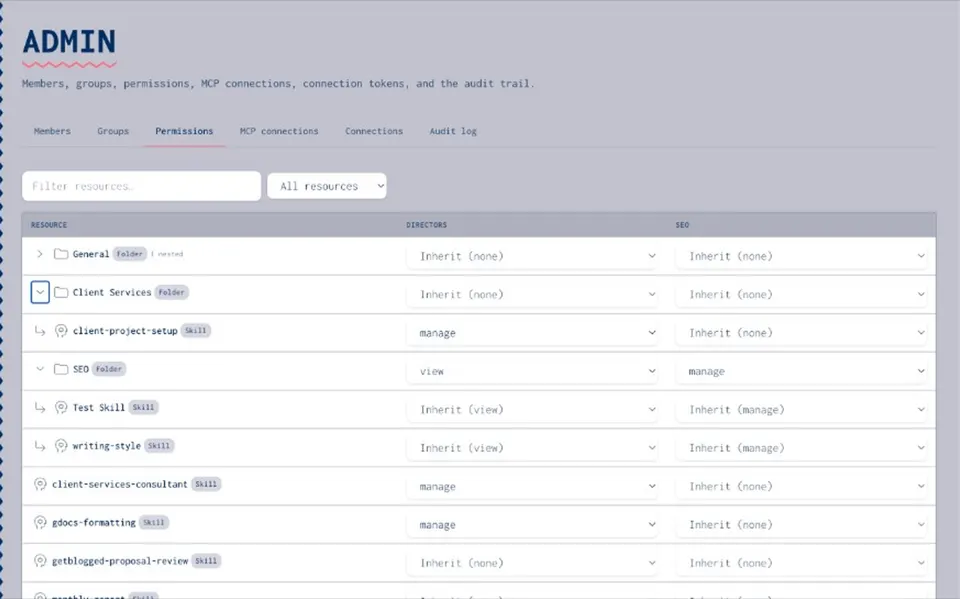
ENTERPRISE AI GOVERNANCE
Permissions on AI assets for enterprise AI governance
- Why permissions on AI assets
Skills, prompts, MCPs, secrets, and agents change behaviour in production. Without tiers, everyone can edit everything — or nobody can tell who published the live version.
- Groups and folder bulk permissions
Apply rights at folder and group level so you are not clicking asset-by-asset for every team change.
- One model across five asset types
Same permission model on skills, prompts, MCPs, secrets, and agents — enterprise AI governance that is asset-framed, not a policy PDF alone.
PERMISSION TIERS
View, use, and manage tiers
- View
See the asset and its docs without running or editing it — useful for reviewers and onboarding.
- Use
Run approved prompts, skills, MCPs, secrets, and agents without granting edit or publish rights.
- Manage
Edit, share, and publish. Manage stays with owners so everyday use can widen without widening edit.
- Groups and folders
Set view / use / manage on folders and groups so large catalogues stay workable for ops.
AUDIT
Central audit trail
- Who changed what
Review who changed permissions, published assets, or adjusted share levels — something you can show when ops or security asks.
- Across all five asset types
One trail for skills, prompts, MCPs, secrets, and agents so governance is not a one-off per tool.
- Tied to secrets and MCP allow-lists
Secrets vault and private MCP catalogue inherit the same org control story — keys and servers are not side channels.
- Beside permissions
Audit sits next to view / use / manage — who can change an asset and who did change it stay linked.
Beside your IDP
Beside your IDPPrompt management
Prompt managementSkills registry
Skills registryMCP catalog
MCP catalogSecrets vault
Secrets vaultAgents
AgentsPermissions and audit trail FAQ
View, use, and manage — so you can separate who runs an asset from who can edit or publish it.
A central audit trail records relevant changes so ops and security can review who did what on AI assets.
No. Joyst productises permissions and audit on skills, prompts, MCPs, secrets, and agents — not a generic compliance framework replacement.
No. Joyst sits beside developer portals. IDPs catalogue software; Joyst catalogues the AI asset layer.
Yes — folders and groups help you set rights without asset-by-asset busywork.