

DOCUMENT MCP TOOLS
Document MCP tools so your team (and agents) know what they do
Undocumented MCP servers slow onboarding and make risky calls more likely. Joyst lets you annotate and document MCP tools in a private org catalogue — living docs humans and agents share. You get clarity on what each server does — not a public MCP directory.
THE ONBOARDING TAX
Document MCP tools and cut the onboarding tax
- Undocumented MCPs = onboarding tax
New people (and new agents) cannot tell what a server exposes, who owns it, or whether it is approved. Guessing wastes time and creates risk.
- Notes next to the connection
When documentation lives beside the MCP in the private catalogue, onboarding stops depending on Slack archaeology.
- Clarity before wider use
Document MCP tools before they reach more of the team — so allow-list decisions are based on what the tool actually does.
ANNOTATE IN PLACE
Annotate tools in the catalogue
- Human annotations beside tools
Add human annotations beside the tools your org connects. Keep the explanation next to the connection — not in a forgotten wiki page.
- Private org documentation
Document the servers your team actually uses. Strangers do not browse your annotations as a marketplace listing.
- Tied to allow-list and approvals
Documentation pairs with approve-what-we-use under the private MCP catalogue and AI governance.
- Catalogue views for operators
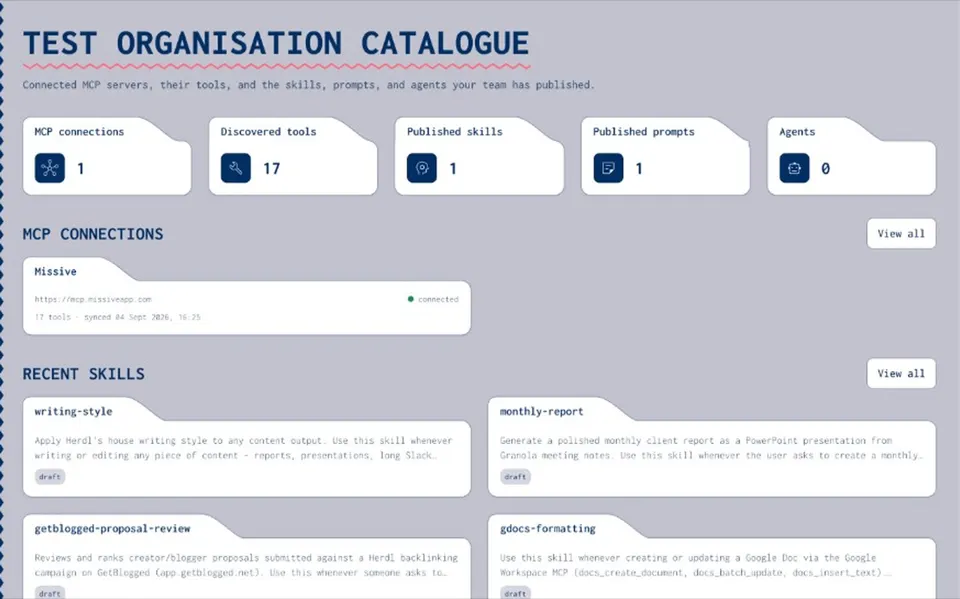
Operators see connected servers, tools, and notes in one place — faster reviews, fewer what-does-this-do pings.
SHARED SOURCE OF TRUTH
Living docs humans and agents share
- Docs stay with the asset
Docs in the catalogue stay with the MCP. When the connection changes, the description is still where people look.
- Same description for people and agents
Agents and people read the same description of what a tool is for — so packaging and runtime stay coherent.
- Feeds skills and agents
Approved, documented MCPs feed skill and agent packaging so setups stay coherent when tools improve.
- Not a public directory
Living docs here mean your private org catalogue — not a public MCP directory or marketplace browse list.
Private vs public MCP registry
Private vs public MCP registrySkills registry
Skills registryAgents
AgentsSecrets vault
Secrets vaultAI governance
AI governanceDocument MCP tools FAQ
Annotate servers and tools in the private org catalogue so descriptions live with the connection — shared by humans and agents.
No. Private org catalogue only — not a marketplace browse list.
Yes. Living docs in the catalogue are meant for both people and agents consuming approved tools.
Documentation supports allow-list decisions: you know what you are approving before it reaches wider use.
No. Joyst catalogues the AI asset layer — skills, prompts, MCPs, secrets, and agents — beside a developer portal.