

SKILLS REGISTRY
Skills registry. Manage, version and share across AI tools.
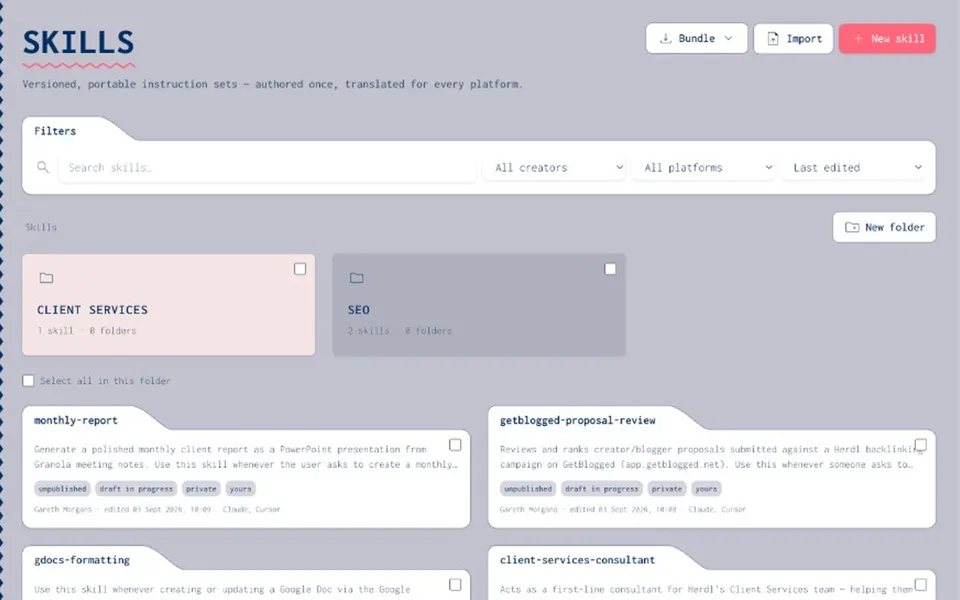
A skills registry is where your organisation publishes skills for the team to use, with clear owners, versions and permissions. Joyst is that private registry. Write a skill once, manage it across your AI tools and share it without keeping a separate copy for each vendor. It is private to your organisation and is not a public marketplace.
FOR ORGANISATIONS
What a skills registry is for organisations
- Clear ownership
Someone owns each skill, drafts it and publishes it. The team uses the approved version, and folders and permissions keep the catalogue tidy.
- Private to you
A marketplace is for public browsing and downloads. Joyst is a private registry where you manage your own skills.
- Publish, then use
Your organisation publishes skills in the registry and the team uses them, with owners, versions and permissions in one private catalogue.
ONE REGISTRY
Manage skills across AI tools
- Claude, Cursor and your agents
One registry lets you manage skills across Claude, Cursor, agents and other tools, so copies do not drift apart unnoticed.
- Write once
Stop maintaining a separate set of skills for each vendor. Write each skill once in the private registry and sync it from there.
- One copy, not many
Copying skills into each tool creates versions that no longer match. Put the skill in the registry first, so the team shares one owned version.
PORTABILITY
Skill portability across AI tools
- Sync across tools
Move skills between the AI tools your team already uses. The registry keeps the master copy, rather than any one vendor’s app.
- Two-way sync over MCP
Where MCP fits your setup, two-way sync keeps the catalogue and your connected tools aligned.
- Manage across Claude and Cursor
If your team already uses Claude and Cursor skills, Joyst helps you manage and sync them across the team.
AGENTS
Skills inside agents
- Package with MCPs and prompts
Skills rarely work alone. Package them with MCP servers and prompts into reusable agent setups that stay consistent across tools.
- Approved parts only
The MCP catalogue and prompt management sit alongside the skills registry, so every package uses approved parts.
- Clear publishing rights
AI governance decides who can publish and use each skill, with the same permissions across the whole catalogue.
EXPLORE
Keep exploring.
- Prompt management
Pair skills with versioned team prompts.
Open - MCP catalogue
Connect approved MCP servers alongside the registry.
Open - Agents
Package skills into reusable agent setups.
Open - AI governance
Permissions and an audit trail for skills.
Open - Version and share skills
Draft, publish, assign owners and share with the team.
Open - Manage Claude & Cursor skills
One registry across the tools your team already uses.
Open - Skill portability
Sync and move skills without a copy for each vendor.
Open
Skills registry FAQ
A skills registry is a controlled catalogue where your organisation writes, versions and shares skills for the team to use. Every skill has a clear owner.
A marketplace is for public browsing and downloads. Joyst is a private registry where you manage your organisation’s own skills.
Write the skill once in Joyst. On publish, Joyst writes downloadable files. Claude Code and Cursor are the defaults. It can also write files for Codex CLI, Copilot and Windsurf. Joyst does not push those files into the apps. A connected tool can pull the skill through Joyst’s own MCP. The tool then writes the file.
Tools do not all read the same skill file. Joyst keeps one team copy. On publish it writes a downloadable file for Claude Code, Cursor, Codex CLI, Copilot and Windsurf. Claude Code and Cursor are the defaults. You do not keep a separate copy inside each of those tools.
Publishing does not push a skill into anyone’s tools. Update checks stay off unless an organisation admin turns them on. When they are on, the tool is asked to check for a newer version before it overwrites the local file.
Paste or upload a SKILL.md file. Joyst saves it as a private draft. It does not publish that draft for you. Joyst does not pull skills from a Claude or Cursor account.
Create your private skills registry
Create an organisation account and publish skills your team can use, with owners, versions and permissions.
- Private to your organisation
- Draft, then publish
- Sync across AI tools