

PROMPT MANAGEMENT
Prompt management for teams — version, share, and reuse
Your best prompts should not live in Slack threads, Notion dumps, and chat sidebars. Joyst gives your organisation prompt management in a private place to write, store, version, and share prompts — then reuse them in agents and across AI apps. You get an AI prompt library under org control — not a public ChatGPT prompt list.
WHY TEAMS NEED IT
Why prompt management — not another prompt list
- Scattered prompts cost quality
When the same brief lives in ChatGPT, Claude, Cursor, and Slack, nobody knows which wording is approved. Prompt management puts one owned copy in a private catalogue.
- Not a public prompt listicle
Free ChatGPT prompt lists are browse content. Org prompt management is private, versioned, and permissioned — strangers do not browse your prompts.
- Ownership before reuse
Someone owns the prompt, drafts and publishes it, and the team reuses the approved version in agents and AI apps.
TEAM LIBRARY
Team AI prompt library
- One private AI prompt library
Keep team prompts in a shared AI prompt library with owners and folders — not scattered across chat sidebars and Notion dumps.
- Not ChatGPT prompt lists
Public download lists are browse content. A team AI prompt library is private, versioned, and permissioned for your organisation.
- Onboard onto approved prompts
New starters use the published library instead of hunting Slack for last month’s brief.
VERSION CONTROL
Prompt versioning and version control
- Draft, publish, note
Keep history with notes so you know why wording changed and which copy is live.
- Roll back when something breaks
Restore a prior version when a change causes bad outputs — tools should not keep last month’s wording unnoticed.
- Tied to the team library
Versioning sits on the same team prompt library under prompt management — draft versus published with clear ownership.
- History your team can trust
When more than one person edits or more than one tool consumes a prompt, version control stops silent drift.
REUSE
Prompts that travel
- Into agents
Package prompts into agent setups so harnesses use the approved copy.
- Across AI apps
Reuse the same owned prompt across Claude, Cursor, and other tools your team already pays for.
- Keys stay in the vault
Keep API keys out of prompt text — store credentials in the secrets vault with controlled substitution.
- Same governance model
Publish rights and audit sit under AI governance across the private catalogue.
ORG CONTROL
Prompt manager for organisations
- Folders and ownership
Organise prompts so the right people manage each one — not a free-for-all paste bin.
- Publish rights
Drafts stay drafts until someone with manage rights publishes.
- How Joyst prompt management works
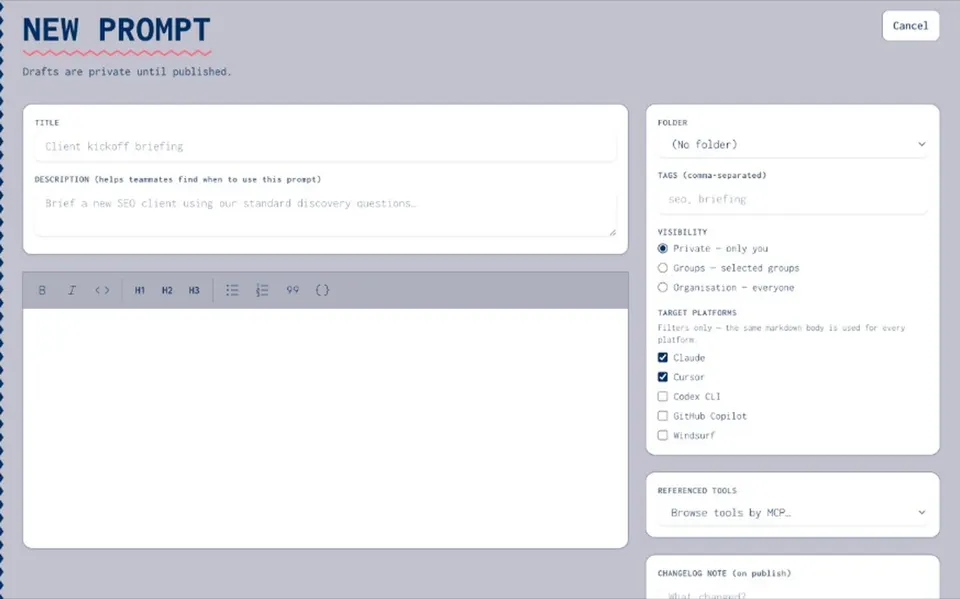
Create the prompt in your private catalogue, organise with folders and owners, keep version history, then share at private, group, or organisation level and reuse in agents and across AI tools.
EXPLORE
Related pillars and guides
- Skills registry
Pair prompts with versioned skills across Claude, Cursor, and agents.
Open - Agents
Package prompts into reusable agent setups.
Open - Secrets vault
Keep API keys out of prompt text with controlled substitution.
Open - AI governance
Permissions and audit on prompts across the private catalogue.
Open - Team prompt library
Shared AI prompt library with owners and folders.
Open - Prompt manager
Folders, ownership, and publish rights for organisations.
Open - Share prompts with team
Private, group, and organisation share levels.
Open
Prompt management FAQ
How your team creates, stores, versions, permissions and reuses prompts in one controlled place — instead of scattering them across ChatGPT, Claude, Cursor and Slack.
Free lists are public browse content. A team library is private, versioned and permissioned for your organisation — strangers don’t browse your prompts.
In the org catalogue under prompt management — then reuse into agents and across AI apps. Chat sidebars are fine for experiments; they’re not the source of truth.
Start managing prompts in your private team catalogue
Create an organisation account and bring your first prompts into one owned place — draft, publish, and share with the team.
- Private org catalogue
- Draft → publish workflow
- Share at private, group, or org