

HOW-TO
How to connect and document an MCP server
Register MCP servers your organisation uses, introspect tools, annotate them in plain language, and keep an allow-list the team can trust — private catalogue, not a public directory.
STEPS
Connect and document an MCP server
- Connect
Register the MCP server with the auth your org uses (static or OAuth as supported).
- Introspect
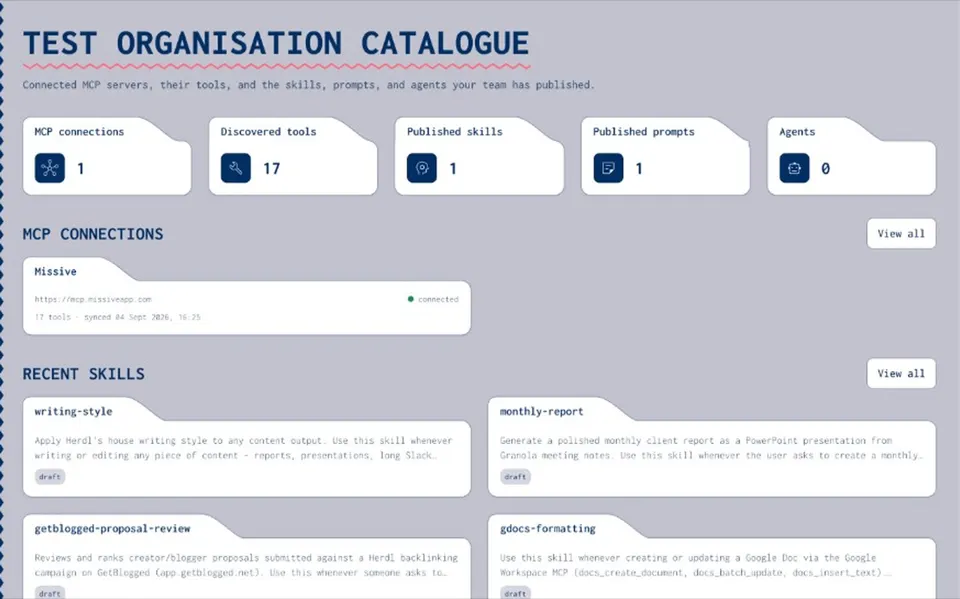
Joyst runs tools/list and imports tools with schemas.
- Annotate
Add human notes — when to use, gotchas, examples — so schemas become usable knowledge.
- Approve
Keep the private allow-list current; re-sync on demand or schedule.
- Use in agents
Packages reference catalogue endpoints — Joyst does not proxy live third-party calls.
WHAT YOU ARE BUILDING
Private MCP catalogue
- Inventory
Know which servers and tools exist for the org.
- Living docs
Annotations stay with the tools — not in a stale wiki.
- Not a marketplace
You are not browsing strangers' servers as the product.
- Not a gateway (today)
Catalogue and govern; agents connect to third-party MCPs directly.
Resources hub
Resources hubMCP catalogue
MCP catalogueDocument MCP tools
Document MCP toolsPrivate vs public MCP registry
Private vs public MCP registryAgents
AgentsAI governance
AI governanceSecrets vault
Secrets vaultPrivate MCP vs marketplace
Private MCP vs marketplaceMCP catalogue how-to FAQ
No. Catalogue and govern. Agents connect directly. Controlled secrets substitution is the special case.
Public registries help discovery. Joyst is the private org allow-list and documentation layer.
Enterprise MCP gateway is roadmap — skipped for this resources wave.