

PROMPT VERSIONING
Prompt versioning — draft, publish, and roll back
You changed a prompt in one tool and broke another. Or someone “improved” the company brief overnight and half the team still runs last week’s copy. Prompt versioning is version control for team prompts: history, notes, publish gates, and rollback — so your team prompt library stays trustworthy.
WHY IT MATTERS
Why prompt versioning matters
- Prompts are production assets
Prompts change tone, constraints, and structure. Without versions, one surface gets updated while another stays stale — and you cannot prove what ran yesterday.
- Version control for prompts
Prompt versioning is version control for team prompts — history, notes, and restore — not a prompt-engineering course for the whole company.
- Know what ran yesterday
When wording drifts across ChatGPT, Claude, Cursor, and agents, quality depends on which copy someone opened. Versions give you a single published source of truth.
LIFECYCLE
Draft, publish, and roll back
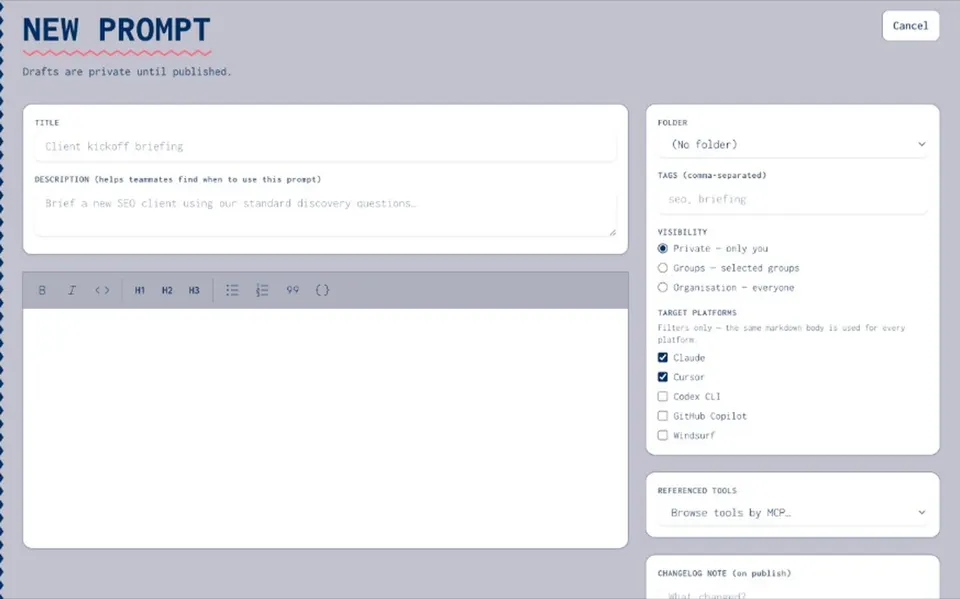
- Draft while you experiment
Change a prompt as a draft so experiments stay out of the way of the published copy your team relies on.
- Publish when the team should switch
Publish when the new wording is ready for org use — agents and apps consume the published version, not last month’s sidebar paste.
- Notes on every version
Version notes record why the prompt changed, so you and your auditor can see the reason later.
- Roll back when outputs break
Restore a prior version when a change causes bad outputs or breaks a downstream agent — return to known-good wording.
ACROSS TOOLS
Stop drift across AI tools
- One published copy
When ChatGPT, Claude, Cursor, and an agent each hold a slightly different prompt, quality depends on which copy someone opened. Joyst keeps the published version as source of truth.
- Central versioning
Edit once, publish once, reuse everywhere — so tools and agents stop diverging on last week’s wording.
- Approved prompts for the org
Approved prompts are a governance practice — detail under AI governance when security cares who can change live wording.
- Reuse without paste drift
Agents and apps consume the published version — not a paste from someone’s chat history.
BESIDE VERSIONING
Tied to the team prompt library
- Versioning sits on the library
Prompt versioning lives on the team prompt library under prompt management. Storage and history are sibling jobs — not the same page.
- Permissions follow publish
Publish rights follow view / use / manage. Drafts stay drafts until someone with manage rights publishes.
- Open the team prompt library
See the dedicated team prompt library page for the shared, permissioned catalogue — the sibling job to draft, publish, and roll back.
Prompt management
Prompt managementPrompt manager
Prompt managerAgents
AgentsSecrets vault
Secrets vaultAI governance
AI governanceBlog: what is prompt versioning
Blog: what is prompt versioningPrompt versioning FAQ
Keeping history of prompt changes with the ability to publish and restore prior versions — version control for prompts.
Restore a previous version when a published change causes problems. Your team returns to known-good wording.
Versioning helps as soon as more than one person edits or more than one tool consumes the same prompt.
No. It is product versioning for prompts inside Joyst — not a git course for your whole company.
Neither. Joyst is the private team catalogue for skills, prompts, MCPs, secrets, and agents.