

PRIVATE MCP CATALOGUE
Private MCP catalogue — manage and document the servers your team uses
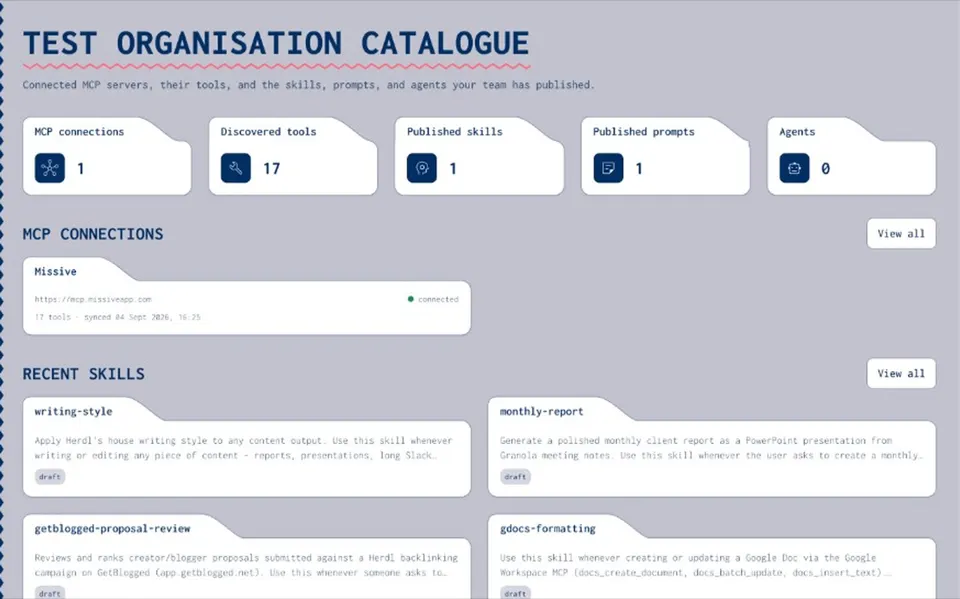
Without an org catalogue, people connect whatever they find — undocumented, unowned, and hard to audit. Joyst is a private MCP catalogue: connect servers, document tools, and approve what your team and agents can use. You get an org allow-list — connect, document, approve — not a public MCP marketplace.
ALLOW-LIST, NOT MARKETPLACE
Private MCP catalogue vs public marketplace
- Discovery vs governance
Public directories and marketplaces help people discover servers. Governing what your organisation is allowed to connect is a different job.
- Private org allow-list
Joyst’s lane is a private MCP catalogue: inventory, annotation, ownership, and approval for what your team may use — not browse-and-install as the main product.
- Not an official registry
Joyst is an independent private team catalogue. It is not the official Model Context Protocol registry and not a public MCP marketplace.
MCP SERVER MANAGEMENT
MCP server management for organisations
- Inventory with ownership
Connect the servers your team uses. Keep ownership so onboarding does not start from a Slack screenshot.
- Know what is live
See which MCP servers are connected before an agent depends on them — management intent, not a download listicle.
- Org catalogue as source of truth
One private catalogue for the servers your organisation allows, so platform and security buyers share the same picture.
DOCUMENTATION
Document and annotate MCP tools
- Annotate what each MCP exposes
Undocumented tools slow onboarding. Annotate capabilities so humans and agents share the same understanding.
- Docs in the catalogue
Keep tool documentation in the private catalogue rather than in a Slack channel or a one-off Notion page.
- Shared picture for agents
When agents and people read the same annotations, approved tools stay coherent across skills and harnesses.
ALLOW-LIST
Approve what the team can use
- Governed allow-list
Allow-list patterns let platform and security buyers decide which servers are approved — without blocking productive AI work.
- Stop ad-hoc installs
Replace unmanaged one-off connections with an org decision about what the team and agents may use.
- Permissions and audit
Who can connect and who can approve sits under AI governance — the same permissions model across the private catalogue.
ROADMAP / SUPPORTING
Enterprise MCP gateway (roadmap)
- Least privilege for tools
Gateway-style filtering means choosing which tools from a remote MCP AI can call — not handing every capability to every agent.
- Start with the catalogue today
Enterprise MCP gateway controls are a supporting / roadmap conversation. Begin with the private catalogue and allow-list now.
- Honest framing
Joyst does not claim a live enterprise gateway product on this page. Talk to us if gateway controls are on your checklist.
BESIDE THE CATALOGUE
MCPs inside agents and skills
- Approved MCPs in packages
Skills and agents pull approved MCPs from the catalogue rather than inventing one-off connections.
- Beside skills and agents
The skills registry and agents pillars sit beside the MCP catalogue so packages use approved ingredients.
- Credentials in the vault
Credentials for MCP tools belong in the secrets vault — not pasted into chat.
Connect → annotate → approve
Inventory the servers your team uses, document tools for humans and agents, then allow-list what the organisation may use — without becoming a public MCP marketplace.
Document MCP toolsChecklist
- Connect MCP servers with ownership
- Annotate tools so humans and agents share one picture
- Approve what the team and agents may use
Inventory
Know what is connected
See which MCP servers are live before an agent depends on them.
Allow-list
Govern before scale
Platform and security share one private catalogue decision.
Private catalogue
Org allow-list, not marketplace browse
Joyst catalogues and approves capability. Agents still connect to third-party MCPs directly.
EXPLORE
Related pillars and guides
- Skills registry
Pair MCPs when skills and tools travel together.
Open - Agents
Package approved servers into reusable harness setups.
Open - Secrets vault
Keep MCP tool credentials by reference.
Open - AI governance
Permissions and audit on what the team can use.
Open - Private vs public MCP registry
Org allow-list versus marketplace discovery.
Open
MCP catalogue FAQ
An organisation allow-list: connect the servers your team uses, document tools, and approve what people and agents may use — not a public browse-and-install marketplace.
Marketplaces and public registries help discovery. Joyst adds the private layer for what your organisation is allowed to connect. It’s not the official Model Context Protocol registry.
Catalogue the MCP servers your organisation allows
Create an organisation account and connect, document, and approve the servers your team and agents may use.
- Private org allow-list
- Connect → annotate → approve
- Not a public marketplace