

HOW-TO
How to add and sync a skill
Add skills to your private registry, keep draft and published states, share with the team, and port across tools so forks do not diverge.
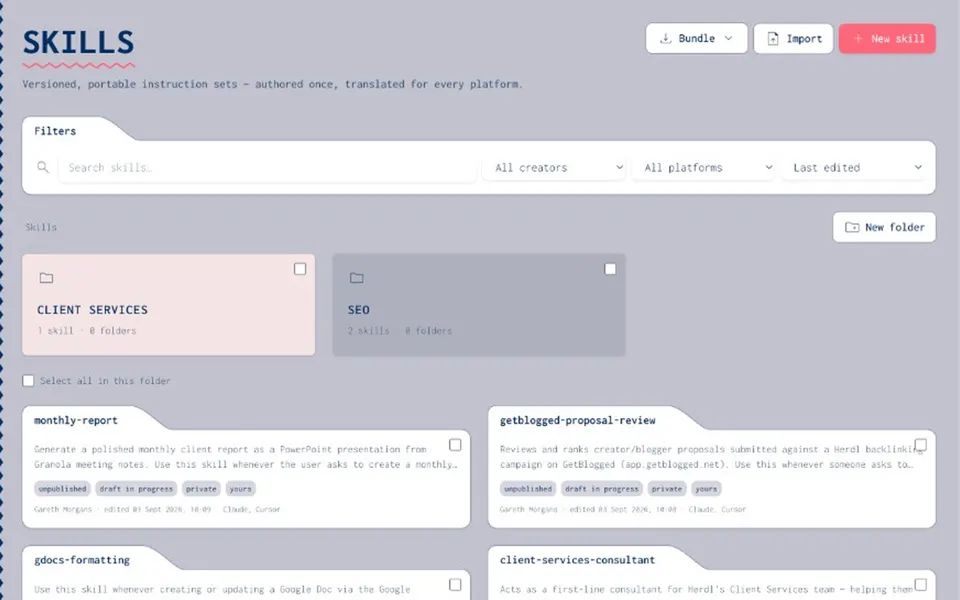
STEPS
How to add and sync a skill
- Add
Create or import a skill into the private registry.
- Version
Draft safely; publish when ready. History is not rewritten.
- Share
Folders, tags, and private / group / org visibility.
- Sync / port
Translate for target platforms and pull via Joyst's hosted skills MCP where applicable.
- Package
Include published skills in agent recipes.
WHY REGISTRY
One source of truth
- Ownership
Someone owns the skill; the team consumes the approved build.
- Across tools
Stop maintaining parallel trees for Claude, Cursor, and agents.
- Governed publish
Who can publish sits under the same permissions model.
- Not a marketplace
Your org's skills only.
Resources hub
Resources hubSkills registry
Skills registryWhat is a skills registry
What is a skills registryManage skills across AI tools
Manage skills across AI toolsVersion and share skills
Version and share skillsSkill portability
Skill portabilityClaude and Cursor skills
Claude and Cursor skillsAgents
AgentsManage skills blog
Manage skills blogSkills how-to FAQ
Both work — import existing SKILL.md-style content as a private draft, or author in Joyst.
Treat the registry as source of truth; confirm platform-specific sync behaviour in your release notes.
Core draft/publish/share/port model is live. Exact sync UX may still be refined.