

VERSION AND SHARE SKILLS
Version and share skills — clear ownership for the team
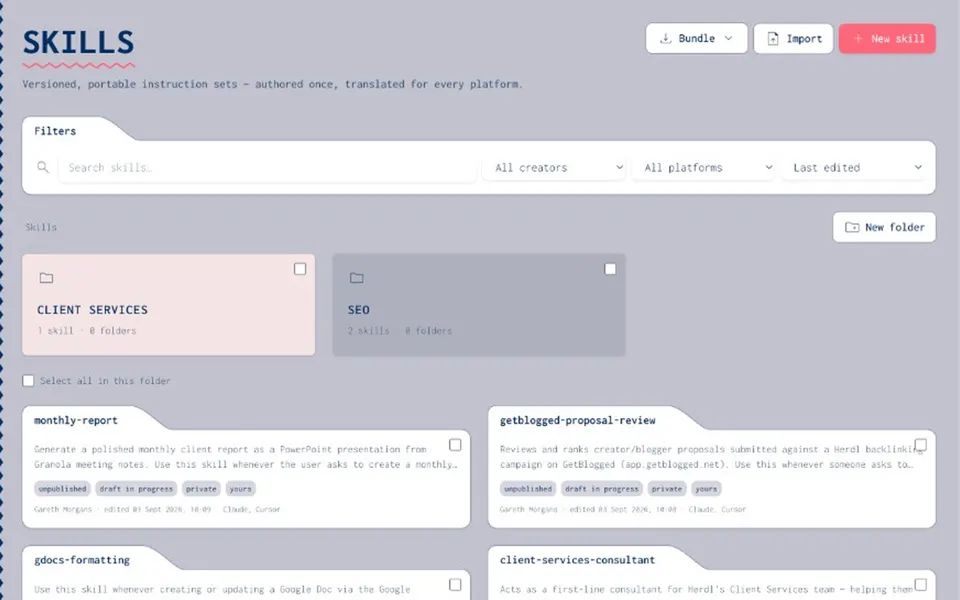
If skills live as Slack files or private forks, nobody has a shared library. Joyst gives you skill version control and team sharing inside a private org skills library: draft vs published, folders, permissions, and updates agents can consume.
FOR TEAMS
Ownership that scales when you version and share skills
- Team skills library (private)
A team skills library is where your organisation keeps skills with owners — not a public pack browser. Private by default. Share deliberately.
- Share skills with clear ownership
When you version and share skills, someone owns each one. Updates go to the published library instead of silent forks in Slack and local folders.
- Not a marketplace
This is your private org skills library — folders, permissions, and draft vs published — not public skill packs.
SKILL VERSION CONTROL
Draft vs published — skill version control
- Draft while you iterate
Draft skills stay out of the default path. Publish when the team — and agents — should use them.
- Published as the shared version
Skill version control makes the published state the one consumers check for. History helps you know what the team should run — and move back when needed.
- Central updates agents check for
When a skill improves, agents should run the published version — not last month’s copy. Central updates close that loop.
- Tied to manage-across-tools
If you also manage skills across AI tools, versioning and sharing are what make the central registry trustworthy.
ACCESS
Folders and permissions
- Folders group related skills
Folders organise the private library so teams can find and own related skills without dumping everything in one list.
- Permissions for view, use, and manage
Permissions decide who can view, use, or manage. Platform or AI ops can publish; wider groups can consume.
- Governed publishing
Tie publish rights to AI governance when security cares about who can change agent ingredients. Package skills into agents alongside MCPs and prompts.
- Share deliberately
Share skills via folders and permissions — not by pasting files into chat. Ownership stays clear as the library grows.
Manage skills across AI tools
Manage skills across AI toolsSkill portability
Skill portabilityManage Claude & Cursor skills
Manage Claude & Cursor skillsAgents
AgentsMCP catalog
MCP catalogAI governance
AI governancePrompt management
Prompt managementVersion and share skills FAQ
Draft and published states with history so you know what the team should run — and can move back when needed.
People with manage rights on the skill or folder. View/use can be broader than publish.
Agents can check for updates to published skills so they are not stuck on stale forks. Pair with manage skills across AI tools for port and sync.
No. Private org skills library only — not a marketplace.
No. Joyst is the private team catalogue for skills, prompts, MCPs, secrets, and agents.