

HOW-TO
How to create and version a prompt
Create the working copy in your private catalogue, organise it, publish when ready, and keep history so the team knows which wording is live.
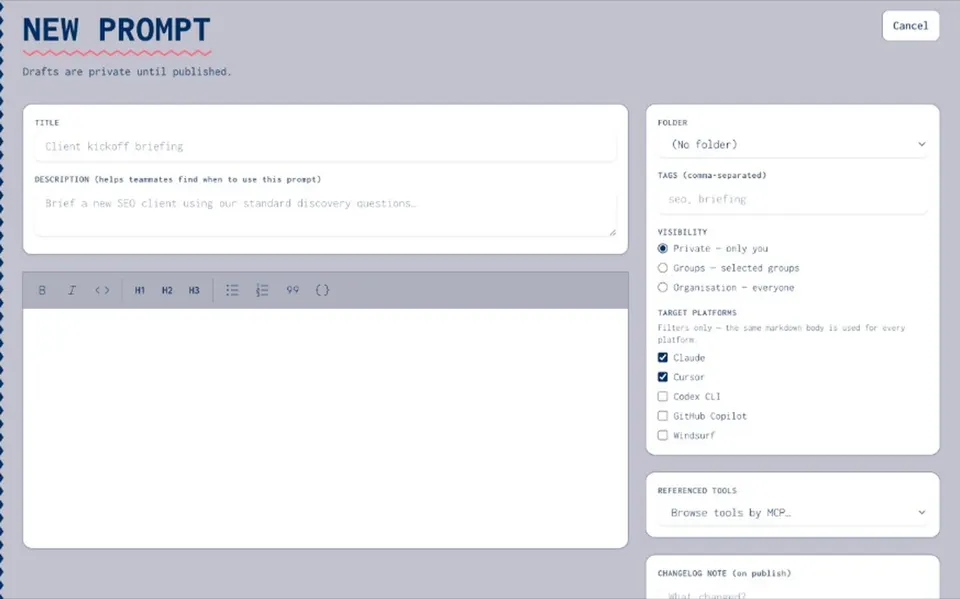
STEPS
How to create and version a prompt
- Create
Add a new prompt in the org catalogue with a clear title and owner.
- Organise
Use folders and tags so teammates can find the right brief.
- Version
Edit opens a draft on a published prompt. Publish when the wording is approved.
- Roll back
History is kept — return to a previous published version when needed.
- Reuse
Share with groups; reference in agents; copy when you run it in ChatGPT or Claude.
CONTROLS
What sits on each prompt
- Visibility
Private, group, or organisation.
- Permissions
View, use, or manage — same model as the rest of the catalogue.
- Notes on change
Record why a version shipped so audits and onboarding stay clear.
- No keys in text
Put credentials in the secrets vault, not in the prompt body.
Resources hub
Resources hubPrompt management
Prompt managementTeam prompt library
Team prompt libraryPrompt versioning
Prompt versioningScattered prompts how-to
Scattered prompts how-toWhat is prompt versioning
What is prompt versioningSecrets vault
Secrets vaultAgents
AgentsPrompt how-to FAQ
Published prompts are available to people with access. Drafts stay private until you publish.
Yes — reference approved prompts inside agent packages.
Draft/publish/rollback and share tiers are product truth. Exact button labels may vary by release.