

GET STARTED
Get started with Joyst
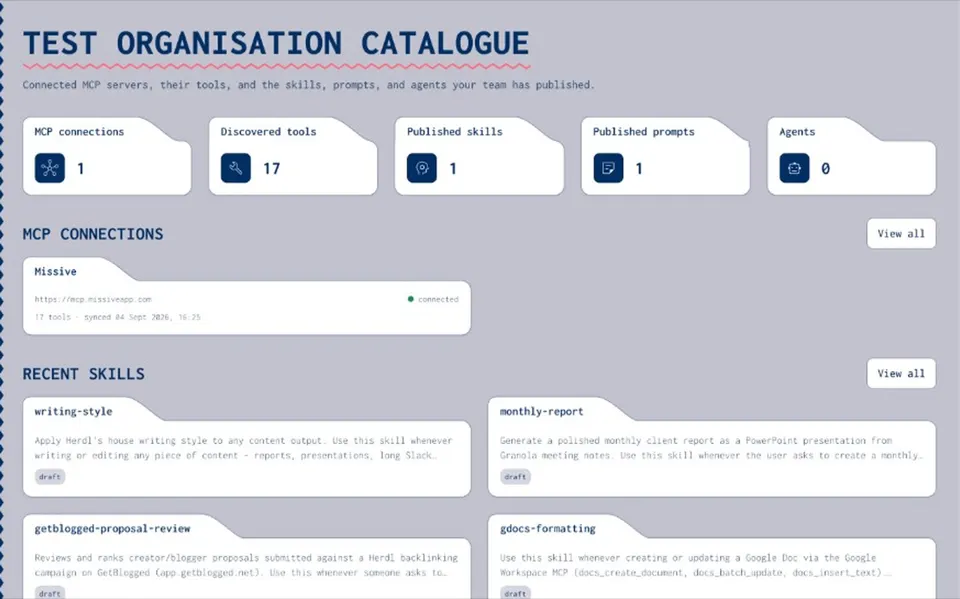
Joyst is the private team catalogue for skills, prompts, MCPs, secrets, and agents. This page orients you: sign up, understand the workspace, then pick the asset type you need first.
LOCK LINE
What you are signing up for
- Private catalogue
Organisation-scoped inventory — not a marketplace.
- Five asset types
Skills, prompts, MCPs, secrets, agents — one permission model.
- Across AI tools
Catalogue and govern; keep using the runtimes you already pay for.
FIRST RUN
From sign-up to catalogue
- Create account
Sign up at accounts.joyst.app — then open the product at dash.joyst.app.
- Workspace
Your organisation is the tenant. Groups and folders organise who sees what.
- Add an asset
Start with a prompt or skill you already use — give it an owner.
- Invite later
Share when ready. Beta includes free seats — see pricing.
WHERE NEXT
Pick your first how-to
- Prompts
Create and version a prompt in the org catalogue.
- Skills
Add and sync a skill across AI tools.
- MCP catalogue
Connect and document a server for the team.
- Secrets
Add secrets safely without pasting into chat.
Resources hub
Resources hubWhat is Joyst
What is JoystCreate and version a prompt
Create and version a promptAdd and sync a skill
Add and sync a skillConnect an MCP server
Connect an MCP serverAdd and use secrets
Add and use secretsCreate an agent package
Create an agent packageSharing and permissions
Sharing and permissionsPricing
PricingUse cases
Use casesGet started FAQ
High-level flow matches the live product. Screenshot-level nav labels may still be refined — treat this as orientation, not a pixel walkthrough.
Joyst is built for organisation catalogues. Invite teammates when you are ready.
The prompts or skills that already cause drift — not every experiment.