

HOW-TO
Sharing — private, group, and org
Every catalogue asset can stay private, open to a group, or go organisation-wide. View / use / manage tiers map to real work — and folders let you set rights in bulk.
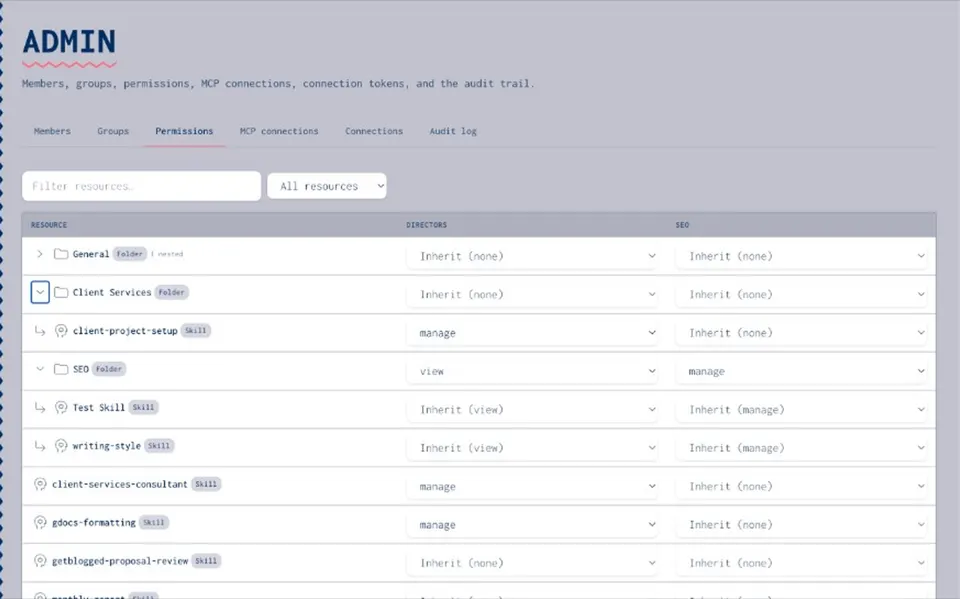
SHARE TIERS
Who can see the asset
- Private
Owner and explicitly granted people only.
- Group
Named groups get access — useful for clients or squads.
- Organisation
Anyone in the org tenant with the right permission can find it.
PERMISSIONS
View, use, manage
- View
Read and discover — without changing the asset.
- Use
Consume in workflows and agents; annotate where allowed.
- Manage
Edit, publish, permission, and organise.
- Folders
Apply bulk permissions so large catalogues stay workable.
TYPICAL FLOW
Sharing and permissions — draft private then share
- Draft privately
Keep work-in-progress out of the wider team.
- Choose tier
Private, group, or org when you publish.
- Assign rights
View / use / manage for the right groups.
- Audit
Changes land in the audit trail under governance.
Resources hub
Resources hubAI governance
AI governancePermissions and audit trail
Permissions and audit trailShare prompts with team
Share prompts with teamVersion and share skills
Version and share skillsGet started
Get startedOnboarding blog
Onboarding blogOwnership blog
Ownership blogSharing FAQ
Drafts stay private until you publish and share.
Yes — skills, prompts, MCPs, secrets, and agents share the permission model.
View / use / manage is product truth; confirm latest Admin labels in your build.