

AI ENABLEMENT
AI enablement for teams, without the chaos
AI enablement means giving people the approved tools, knowledge and guardrails they need to use AI well in their own work. Joyst gives every team the same approved prompts, skills, MCP servers, secrets and agents, with clear owners, permissions and an audit trail.
What AI enablement means
AI enablement is the organised work of helping people use AI safely and well in their day-to-day jobs. It covers the tools they are allowed to use, the knowledge that makes those tools useful, the rules that keep the organisation safe and the support that helps people build the habit. AI adoption is the outcome: how many people use AI, how often and for what. Enablement is what you do to get there. You can buy licences for every employee and still see little adoption, because a licence on its own gives people no approved prompts, no documented tools and no safe way to use company keys. Buying tools gives people access. Enablement gives them a clear, approved way to do real work with that access, and gives the organisation a record of what is in use and who looks after it.
THE PROBLEM
Why AI rollouts stall
- Prompts scattered everywhere
Good prompts live in chat histories, personal notes and Slack threads. Each team rewrites them, and nobody knows which version is the approved one.
- One-off MCP connections
People connect MCP servers to their own AI tools. Nobody documents what each tool does, who owns the connection or whether it should be used at all.
- Keys pasted into chat
Without a safe place for credentials, API keys end up in prompts and shared threads, where they sit in model context and chat history.
THE PLAN
The five parts of an AI enablement plan
- Strategy
Decide what AI should help with first. Pick a few high-value workflows, name the teams involved and agree what good looks like before you roll anything out.
- Tools and building blocks
Choose the AI tools people will use, then give them approved prompts, skills, MCP servers, secrets and agent setups to use inside those tools.
- Governance
Set clear rules on who can publish, who can use and who can change each item. Write a short AI usage policy and keep a record of changes.
- People and skills
Train people on the workflows that matter to them, with real examples from their own work. Give each team a named contact for questions.
- Measurement
Agree how you will judge progress before you start, so you can tell a working rollout from a busy one.
Who owns AI enablement
Most organisations give AI enablement to a small owning team, sometimes called an AI Centre of Excellence. It is often a mix of platform, security and operations people, with a champion in each department. The owning team sets the standards, curates the approved building blocks and helps departments move from pilots to everyday use. Pilots usually prove that AI can help. Scaling stalls when the prompts, skills and connections that worked in the pilot stay with the few people who built them. To move from pilot to scale, publish what worked. Turn the pilot’s best prompts and skills into approved, versioned items, document the MCP servers it relied on, store its keys safely and share the lot with the next team.
THE BUILDING BLOCKS
Give every team the same approved building blocks
- Prompts
A team prompt library with versions, folders and tags. People copy the approved wording instead of rewriting it.
- Skills
Versioned skills with draft, publish and rollback, translated for the AI tools your teams already use.
- MCP servers
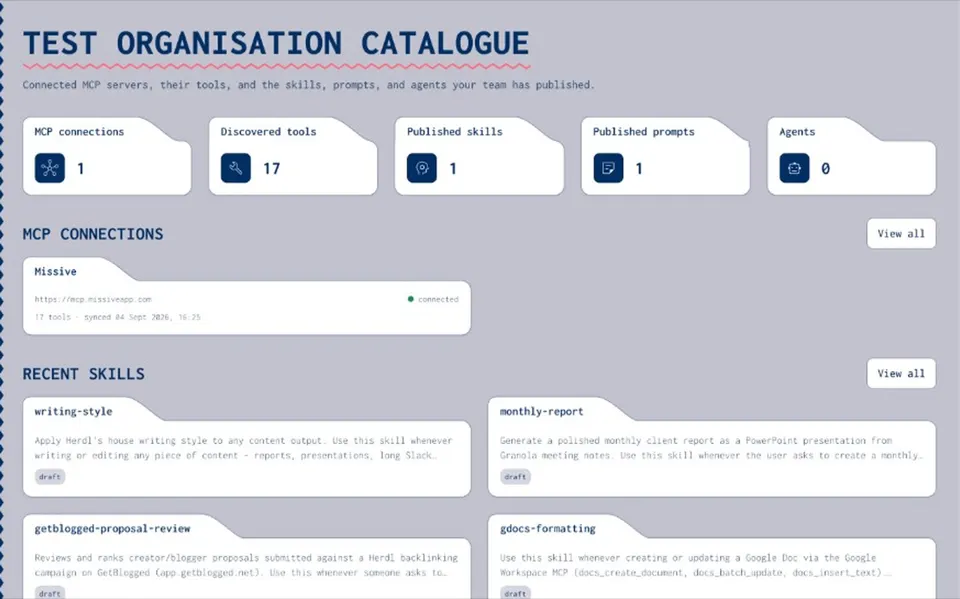
A private catalogue of the MCP servers your organisation uses, with tools imported and notes on how to use each one.
- Secrets
An encrypted vault, private by default. Agents refer to keys by name, so nobody pastes them into chat.
- Agents
Packages that bring published skills, catalogue MCP servers and secret names together into one setup people can reuse.
GUARDRAILS
Enable safely: owners, permissions and an audit trail
- Clear owners
Manage rights sit with the people responsible for each item. Everyone else uses the published version.
- Group permissions
Give groups None, View, Use & Annotate or Manage rights on prompts, skills, MCP servers, agents and folders. Folder rights are inherited.
- Share on purpose
Keep items private, share them with a group or publish them to the whole organisation.
- An audit trail
Connecting, publishing or changing an item writes an audit entry, so you can see who connected, published or changed what.
Onboard new starters on day one
New starters usually learn a team’s AI habits by asking around and copying a colleague’s setup. With a shared catalogue, they start from the same approved prompts, skills, MCP servers and agent setups as everyone else. Invite them into your organisation, add them to the right groups and they see what those groups can use. Agents can fetch a step-by-step setup from Joyst’s hosted MCP server, which works with Claude Code, Cursor, Claude.ai, Grok and similar clients. Each person then connects third-party MCP servers in their own AI tool.
Measure what’s working
Good measurement starts with a few plain questions, agreed before the rollout: Which workflows did we set out to improve, and are people using AI for them? Are teams using the approved prompts and skills, or still writing their own? Which MCP servers do people rely on, and is each one documented and owned? Have any keys been pasted into chat since the rollout started? What do new starters say about finding the right tools in their first week? Is the quality of work better, the same or worse, and how do you know? Answer them with a mix of surveys, conversations with team leads and the records you already keep, such as the audit trail of what was published and changed.
RELATED
Keep exploring.
- Prompt management
A team prompt library with versions and sharing levels.
Open - Skills registry
Version skills and share them across AI tools.
Open - MCP catalogue
Connect, document and approve MCP servers.
Open - Secrets vault
Keys kept out of model context.
Open - Permissions and audit trail
Who can see, use and change each item.
Open - AI enablement plan for onboarding
Get a new team onto approved AI assets.
Open - AI usage policy
Governing skills, prompts and secrets in practice.
Open - Invite users
Bring people into your organisation.
Open
AI enablement FAQ
AI enablement is the work of giving people the approved tools, knowledge and guardrails they need to use AI well in their jobs. It covers strategy, tools, governance, training and measurement.
Adoption is the result: how widely and how well people use AI. Enablement is the work that produces it, such as approved building blocks, clear rules and training.
It sets standards, curates approved prompts, skills, MCP servers and agent setups, supports departments as they move from pilots to everyday use and keeps a record of what is in use.
Start with a few workflows that matter, agree how you will measure progress, choose the tools, publish approved building blocks for those workflows and name an owner for each.
Agree the questions first: are people using AI for the target workflows, are they using the approved versions and is the work better? Use surveys, team feedback and your own records to answer them.
Give people approved items to use, keep keys in a vault rather than in chat, set permissions by group and keep an audit trail of changes. Pair that with a short, clear usage policy.
Give every team the same approved AI building blocks.
Create an organisation account and bring skills, prompts, MCP servers, secrets and agents into one private catalogue.
- Private to your organisation
- Draft, then publish
- Limited open beta