

PROMPT TEMPLATES
Prompt templates your whole team can reuse
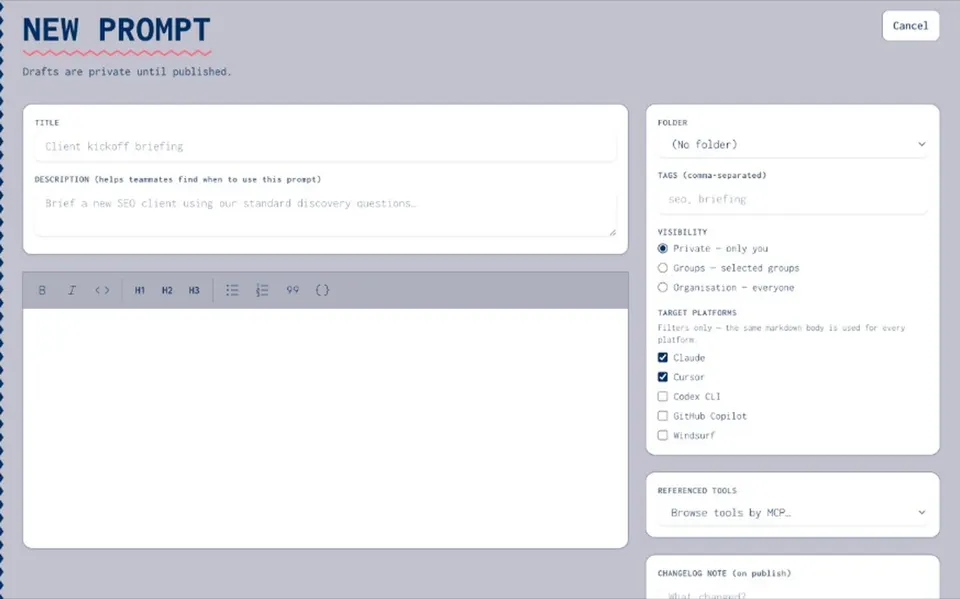
A prompt template is a reusable prompt with gaps you fill in each time. Written well, it gives everyone the same starting point for the same job. Kept in Joyst, it has versions, an owner and permissions, so the team always reaches for the approved copy.
What is a prompt template?
A prompt template is a prompt written once and reused many times. The fixed parts describe the job: who the AI should act as, what it should do and how the answer should look. The variable parts are fields you fill in for each use, such as a client name, a product or a pasted document. Developers often write fields as {variable} placeholders that code fills in automatically. For everyday use in ChatGPT or Claude, a clear marker in square brackets, such as [client name], works well. Anyone copying the template can see what to replace before they send it. In Joyst, fields are a writing convention. Joyst stores the template exactly as written, and you fill in the fields after you copy it.
ANATOMY
The anatomy of a good template
- Role
Tell the AI who to be. "You are a support lead writing to a frustrated customer" sets tone and knowledge in one line.
- Context
Give the background the AI cannot guess: the audience, the product, the constraints and any facts it must use.
- Task
State the job in one clear sentence. One template, one task.
- Format
Describe the output: length, structure, headings, tone and anything to leave out.
- Fields
Mark every part that changes with square brackets, such as [customer name] or [paste the ticket here], so nothing is left behind by mistake.
Example prompt templates
These seven AI prompt templates cover common team jobs. Copy one, fill in the square brackets and paste it into ChatGPT, Claude or any other AI tool. Support reply You are a senior support agent. A customer wrote: [paste message]. Reply in under 150 words. Acknowledge the problem, explain the next step and give a realistic timescale. Warm, plain British English. No jargon. Sales follow-up You are an account executive. Write a follow-up email to [contact name] at [company] after a call about [topic]. Summarise the two points they cared about most: [points]. Propose one next step. Under 120 words. Marketing brief You are a marketing lead. Turn these notes into a one-page campaign brief for [product]: [paste notes]. Include audience, key message, three proof points, channels and a success measure. Use short headings. Blog outline You are an editor. Create an outline for an article titled [title] for [audience]. Give an H1, five to seven H2s with one line each, and three questions readers are likely to ask. Code review You are a senior [language] engineer. Review this change for bugs, security issues and readability: [paste diff]. List issues by severity, with a suggested fix for each. Do not rewrite the whole file. Incident summary You are an operations lead. Summarise this incident for a non-technical audience: [paste timeline]. Cover what happened, the impact, the fix and what will change. Under 200 words. Meeting notes You are a project manager. Turn these notes into decisions, actions with owners and open questions: [paste notes]. Use three short lists.
HOW TO WRITE ONE
How to write a prompt template that works
- Start from a prompt that already works
Take a prompt that gave you a good result, then replace the parts that change with fields.
- Keep one job per template
A template that tries to write, summarise and translate will do all three badly. Split it.
- Show the format
If the output needs a structure, describe it or include a short example.
- Test it with real inputs
Run it on three or four real cases before you share it. Fix what goes wrong.
- Write down why it changed
When you improve a template, note the reason, so the next editor knows what to keep.
ChatGPT custom instructions vs prompt templates
ChatGPT custom instructions are standing preferences that ChatGPT applies to every conversation, such as your role, the tone you like and details it should always remember. Claude offers similar profile preferences and project instructions. A prompt template does a different job. It describes one task, with fields for the details that change each time. Custom instructions shape every answer. A template shapes one kind of answer. Most teams use both: custom instructions for personal defaults, and shared templates for the jobs the whole team does the same way.
VERSIONING
Why shared templates drift, and how versioning stops it
- Copies drift
Once a template is pasted into a doc, a chat and three people’s notes, each copy changes on its own. Output quality starts to depend on which copy someone opened.
- One published version
In Joyst, editing creates a draft. The team keeps using the published version until someone with manage rights publishes the change.
- Notes on every version
Each version records why it changed, so you can see how a template developed.
- Roll back when output breaks
If a change makes results worse, restore the earlier version and carry on.
YOUR LIBRARY
Keep your team’s templates in one private library
- Folders and tags
Organise templates by team, client or job, so people find the right one quickly.
- Share on purpose
Keep a template private, share it with a group or publish it to the whole organisation, with view, use and manage rights.
- Copy and use
Copy the approved template to your clipboard, fill in the fields and paste it into ChatGPT, Claude or any other AI tool.
RELATED
Keep exploring.
- Prompt library
One private library for your team’s approved prompts.
Open - Prompt versioning
Draft, publish and roll back prompts.
Open - Share prompts with team
Share privately, with a group or across the organisation.
Open - Create and version a prompt
A step-by-step guide to your first prompt.
Open - Use templates in agent packages
Bundle approved prompts with skills and MCP servers.
Open - Skills registry
Version skills and share them across AI tools.
Open
Prompt templates FAQ
A reusable prompt with fields you fill in each time. The fixed parts describe the role, context, task and format. The fields hold what changes.
Take a prompt that already works, replace the parts that change with fields in square brackets, test it on a few real cases and save it somewhere your team can find it.
Yes. A prompt template is plain text, so the same template works in ChatGPT, Claude, Gemini or Copilot. Adjust the format line if one tool handles headings or length differently.
Variables, or fields, are the parts that change with each use, such as a name or a pasted document. In code they are often written as {variable}. In everyday use, [square brackets] make them easy to spot.
A prompt is written for one use. A template is written to be reused, with fields for the details that change.
In one shared library with versions and permissions, so everyone uses the approved copy and changes are recorded. Scattered docs and chat threads lead to drift.
No. Custom instructions apply to every conversation. A template covers one task and is shared across the team.
Start your team’s prompt template library.
Create an organisation account and bring skills, prompts, MCP servers, secrets and agents into one private catalogue.
- Private to your organisation
- Draft, then publish
- Limited open beta