

HOW-TO
Remote MCP server: how to connect one to your AI tools
A remote MCP server runs on the internet, not on your laptop. This guide explains how remote and local servers differ, how to connect a remote MCP server to Claude, Cursor and VS Code, and how to give your team one approved list of the servers you use.
What is a remote MCP server?
The Model Context Protocol (MCP) is an open standard that lets AI tools call external tools and data. A remote MCP server is an MCP server hosted at a web address and reached over the internet, instead of a program your AI tool starts on your own machine. Current remote servers use the Streamable HTTP transport, usually at an address ending in /mcp, such as https://mcp.example.com/mcp. Some older servers still use the earlier HTTP with Server-Sent Events (SSE) transport, often at an address ending in /sse. Because the server is hosted, its owner can update it for every user at once, and web-based AI tools such as Claude.ai can use it without anything installed locally.
LOCAL VS REMOTE
Local vs remote MCP servers: which should you use?
- Local (stdio)
Your AI tool starts the server as a process on your machine and talks to it over standard input and output. Credentials usually come from environment variables. Good for files and tools on your own computer.
- Remote (Streamable HTTP)
The server runs at a URL. Your AI tool connects over HTTPS, usually signing in with OAuth or sending an API key in a header. Good for SaaS tools and anything the whole team shares.
- Pick remote when
The tool is a hosted service, you want updates in one place, or people use web and mobile AI clients.
- Pick local when
The server needs your local files, runs a local command or should never leave your machine.
Connect a remote MCP server to Claude
Claude calls remote MCP servers custom connectors. On a Pro or Max plan: 1. Open Customize, then Connectors. 2. Select + and choose Add custom connector. 3. Enter the remote MCP server URL. 4. If the server needs a fixed OAuth client, open Advanced settings and add the OAuth Client ID and Client Secret. 5. Select Add, then Connect to sign in. On Team and Enterprise plans, an Owner adds the connector under Organization settings, then Connectors. Each member then connects to it and signs in with their own account. Claude connects to remote servers from Anthropic’s cloud, not from your device. The server must be reachable over the public internet. A server behind a VPN or firewall needs Anthropic’s IP ranges allowed. Source: Claude Help Center, "Get started with custom connectors using remote MCP".
Connect a remote MCP server in Cursor and VS Code
Cursor reads MCP servers from mcp.json: ~/.cursor/mcp.json for every project, or .cursor/mcp.json in a single project. A remote server needs a url, and can send headers: { "mcpServers": { "example": { "url": "https://mcp.example.com/mcp", "headers": { "Authorization": "Bearer ${env:EXAMPLE_TOKEN}" } } } } Leave out the headers for servers that use OAuth. Cursor opens a sign-in window when you first connect. VS Code reads .vscode/mcp.json in your workspace. It uses a servers object and a type of http: { "servers": { "example": { "type": "http", "url": "https://mcp.example.com/mcp" } } } Keep tokens out of these files. Use environment variables or input prompts instead, especially if the file is committed to git.
Clients that only run local servers: use a bridge
Some AI tools can only start local servers. The open-source mcp-remote package bridges the gap. Your client starts mcp-remote as a local server, and mcp-remote connects to the remote URL and handles OAuth sign-in for you: { "mcpServers": { "example": { "command": "npx", "args": ["-y", "mcp-remote", "https://mcp.example.com/mcp"] } } } mcp-remote stores its sign-in tokens in ~/.mcp-auth on your machine. Remove the bridge once your client supports remote servers directly.
AUTHENTICATION
Authentication: OAuth or API keys
- OAuth
The MCP specification defines OAuth 2.1 for HTTP servers. Each person signs in with their own account and grants only the access the server asks for. Most hosted servers from SaaS vendors work this way.
- API key in a header
Some servers accept a static key, usually in an Authorization header. It is simpler, but the key acts for whoever holds it, so store it safely and rotate it if it leaks.
- No auth
Authorisation is optional in the specification. Public, read-only servers sometimes skip it. Treat those with the same care as any other third-party code.
- Security basics
Connect only to servers you trust, read what each tool does before you allow it, and review the permissions a server asks for when you sign in.
FOR YOUR TEAM
Share approved remote servers with your team
- Register the server
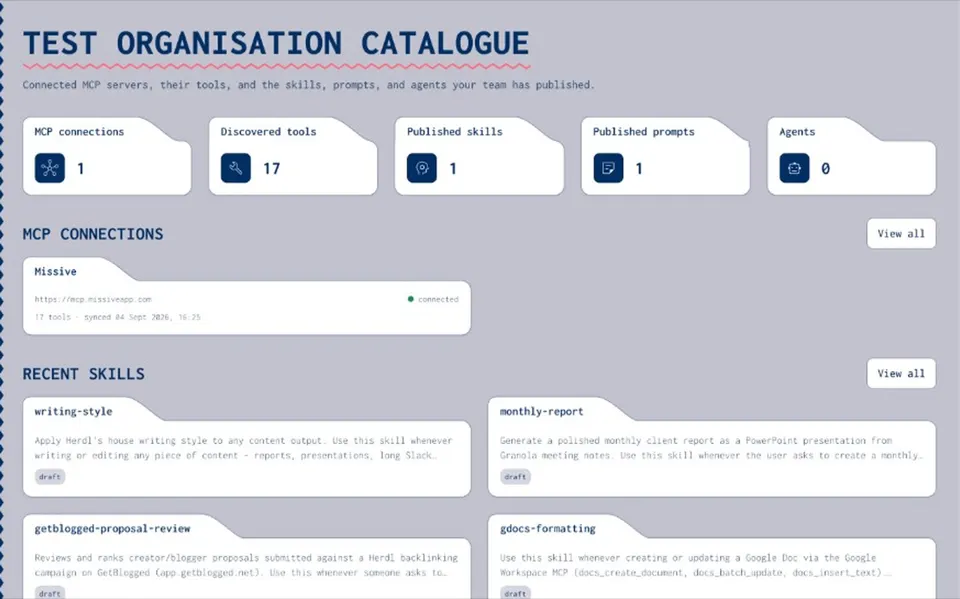
Add the remote MCP server to your organisation’s private Joyst catalogue, with static auth or OAuth where the server supports it.
- Import its tools
Joyst runs tools/list and imports every tool with its schema, so the team can see what the server can do.
- Add notes
Write down when to use each tool, what to watch for and an example, so people and agents use it the same way.
- Set who manages it
Give manage rights to the people who own the connection, and view or use rights to everyone else. Re-sync on demand or on a schedule.
- Connect in your own tool
Each person still connects the server in Claude, Cursor or VS Code. Joyst keeps the approved list and does not sit between your AI tool and the server.
RELATED
Keep exploring.
- How to connect an MCP server
Connect, document and approve servers for your team.
Open - MCP OAuth
How MCP sign-in works, and the errors to expect.
Open - Document MCP tools
Add notes so people and agents understand each tool.
Open - Private vs public MCP registry
How an approved list differs from a public marketplace.
Open - Secrets vault
Keep MCP credentials out of chat and config files.
Open - Agents
Package approved MCP servers with skills and secret names.
Open
Remote MCP server FAQ
An MCP server hosted at a web address. AI tools connect to it over the internet, usually with the Streamable HTTP transport, instead of starting it on your own machine.
A local server runs as a process on your computer and talks over standard input and output. A remote server runs at a URL, is shared by many users and usually signs people in with OAuth.
Open Customize, then Connectors, add a custom connector and enter the server URL. On Team and Enterprise plans, an Owner adds it first and members then connect.
Yes. Add the server to mcp.json with a url. Cursor supports Streamable HTTP and SSE, and signs you in with OAuth when the server needs it.
They can be. Use servers from vendors you trust, prefer OAuth over shared keys, review the permissions you grant and read what each tool does before your team relies on it.
No. Authorisation is optional in the MCP specification. Many hosted servers use OAuth, some accept an API key in a header and a few need no sign-in at all.
Put your team’s remote MCP servers on one approved list.
Create an organisation account and bring skills, prompts, MCP servers, secrets and agents into one private catalogue.
- Private to your organisation
- Draft, then publish
- Limited open beta