

AI INVENTORY
AI inventory for the tools your teams actually use.
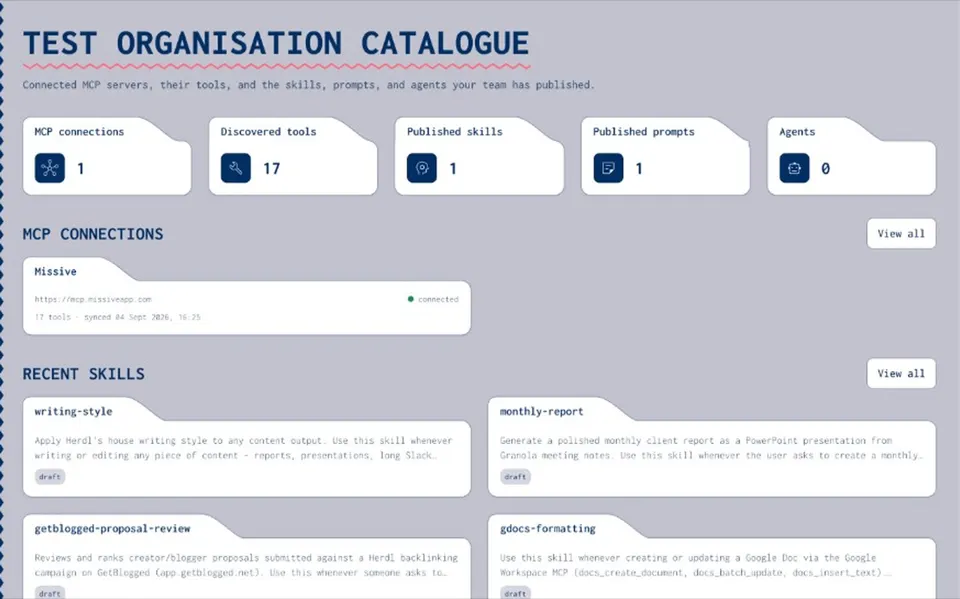
An AI inventory is a maintained record of the AI your organisation uses, who owns each item and how it may be used. Most inventories list models and use cases. Joyst keeps the everyday layer: the skills, prompts, MCP servers, secrets and agents your teams register, with owners, permissions and an audit trail.
What an AI inventory is. And what it misses.
An AI inventory, sometimes called an AI system inventory or AI asset inventory, is a list of the AI systems an organisation uses, with enough detail to govern them: what each one does, who owns it, what data it touches and whether it is live. Governance teams usually start with models and business use cases, because that is where regulators and risk committees look first. The NIST AI Risk Management Framework, for example, asks organisations to map their AI systems and their context. What those inventories tend to miss is the layer people use every day: the prompts pasted into ChatGPT, the skills in Claude and Cursor, the MCP servers connected to AI tools, the API keys those servers need and the agent setups that combine them. That layer changes often, and it rarely makes it into the inventory.
WHAT TO RECORD
What to record for every item
- What it is
A clear name, a short description and the type: skill, prompt, MCP server, secret or agent package.
- Who owns it
The people with manage rights, who can change it, publish it and answer questions about it.
- Who can use it
Its visibility, private, group or organisation, and the groups with view, use or manage rights.
- How to use it
Notes on purpose, when to use it and what to watch for.
- Its current state
Draft or published, the version in use and the last change, with who made it.
MCP SERVERS
MCP servers and every tool they expose
- Import every tool
Connect a server and Joyst runs tools/list, importing each tool with its schema. The inventory holds tools, not only server names.
- Annotate in plain language
Add notes to each tool: when to use it, what to avoid and an example.
- Stay in sync
Sync on demand or on a schedule. Connection health and sync history show failures instead of hiding them.
KEEP IT CURRENT
Keep it current, not a one-off spreadsheet
- The inventory is where the work happens
People draft, publish and share skills and prompts in the catalogue itself, so the record updates as they work.
- Draft, then publish
Changes start as drafts. The published version is the one the inventory, and the team, relies on.
- An audit trail
Connecting, publishing or changing an item writes an audit entry, so you can see who connected, published or changed what, and when.
- Folders and tags
Organise items by department, client or project, and set permissions on whole folders.
Inventory, registry or discovery?
The three words get used loosely. An inventory is the maintained record of what you have. A registry is often the same idea with an approval step, or a technical store such as a model registry that holds model versions for deployment. Discovery means tools that scan networks, devices or cloud accounts to find AI in use. Joyst is an inventory and private catalogue. It records what your teams add to it and keeps that record current. It does not scan your estate or detect AI tools that people use outside it. If you need discovery, pair Joyst with your security or SaaS management tools, and use Joyst as the place where approved items live.
From inventory to governance
An inventory is the first control, not the last. Once you know what you have, you can decide who may use it, who may change it and how changes are recorded. That is AI governance for the everyday layer: permissions by group, draft and publish, keys kept out of model context and an audit trail. An inventory also helps with regulation, as a building block. Frameworks such as the NIST AI RMF and ISO/IEC 42001 expect organisations to know which AI systems they use. A maintained inventory supports that work. On its own, it does not make an organisation compliant.
RELATED
Keep exploring.
- AI governance
Permissions and an audit trail across the private catalogue.
Open - MCP catalogue
Connect, document and approve MCP servers.
Open - Document MCP tools
Add notes so people and agents understand each tool.
Open - Skills registry
Version skills and share them across AI tools.
Open - Prompt management
A team prompt library with versions and sharing levels.
Open - Secrets vault
Keys recorded by name and kept out of model context.
Open - Agents
Package skills, prompts, MCP servers and secret names into reusable setups.
Open - Permissions and audit trail
Who can see, use and change each item.
Open - AI registry vs developer portal
How Joyst works beside your IDP.
Open - AI governance framework
Five practical controls, with a checklist.
Open
AI inventory FAQ
Every AI item people use, with its owner, purpose, who can use it, its current version and its last change. Include the everyday layer: skills, prompts, MCP servers and their tools, secrets by name and agent setups.
No. A model registry stores model versions for deployment. An AI inventory records the AI your organisation uses and who is responsible for it.
Register the servers your team uses in a private catalogue, import their tools and give each one clear owners. Joyst records what is registered. It does not see connections people make outside it.
No. Joyst does not scan networks or devices. It keeps the record of what your teams add. Use discovery tools from your security stack to find unknown AI use.
The person or team who maintains it and answers for how it is used. In Joyst, that is the group with manage rights.
It is a useful building block, because you cannot assess AI systems you have not listed. An inventory alone does not make you compliant. Take legal advice on your obligations.
Start your AI inventory in the private catalogue.
Create an organisation account and bring skills, prompts, MCP servers, secrets and agents into one private catalogue.
- Private to your organisation
- Draft, then publish
- Limited open beta