

GUIDE
An AI governance framework for the tools teams use every day.
An AI governance framework sets out how an organisation decides, controls and records its use of AI. The big frameworks cover models and risk. This guide adds five practical controls for the skills, prompts, MCP servers, secrets and agents your teams use every day, with a checklist you can copy.
What an AI governance framework is
An AI governance framework is the set of roles, rules and controls an organisation uses to make sure its AI is used safely, legally and to good effect. It says who decides, what is allowed, how risks are assessed and how you prove it. Most AI governance frameworks share the same ten parts, set out below. The widely used reference frameworks, such as the NIST AI Risk Management Framework and ISO/IEC 42001, work at the level of AI systems and management processes. They tell you what good governance should achieve. They stop short of the tools people open every morning.
THE PARTS
The parts of an AI governance framework
- Roles and accountability
Name who decides, who approves and who answers for each AI system.
- Inventory
Keep a current list of the AI systems, tools and assets in use.
- Risk assessment
Sort each use by its impact, so high-risk uses get more scrutiny.
- Data, privacy and security
Set out what data AI may touch and how credentials are protected.
- Testing and monitoring
Check outputs before launch and keep checking after.
- Transparency
Tell people when AI is involved and how it shapes decisions.
- Human oversight
Make sure a person can review, override or stop a high-impact decision.
- Incident response
Agree how problems are reported, fixed and learned from.
- Audit
Keep records that show what happened and who changed what.
- Retirement
Decide how systems that are no longer needed are switched off.
Who is responsible for AI governance
Your AI governance model sets out who does what. An executive sponsor usually owns the outcome. A group drawn from legal, security, data and the business writes the AI governance policy and rules on high-risk uses. Named owners run each tool or system day to day. In a smaller organisation, one person may hold several of these roles. Every AI tool still needs someone who answers for it.
THE GAP
The gap: the tools people actually use
- Prompts and skills
The wording and instructions that shape AI output live in chat histories, docs and personal configs, with no owner and no version history.
- MCP servers and keys
People connect MCP servers to their own AI tools and paste API keys into chats to make them work.
- Agents
Agent setups combine all of the above, and get copied from person to person without a record of what changed.
FIVE CONTROLS
Five controls that make it real
- Know what you have
Keep an inventory of the skills, prompts, MCP servers, secrets and agents your teams use, with notes on how to use each one. In Joyst, that is the private catalogue.
- Give everything an owner
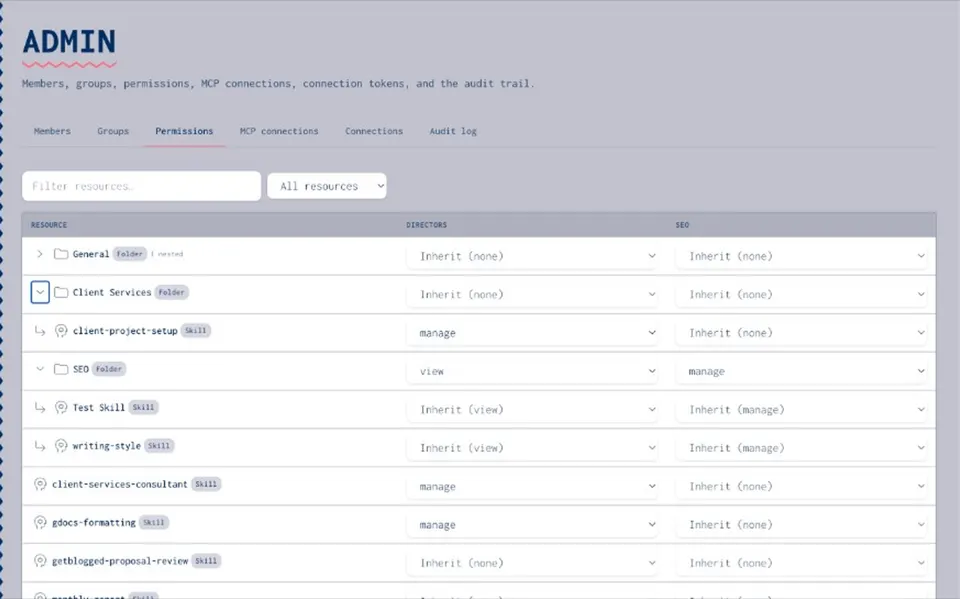
Every item needs people who maintain it and answer for it. In Joyst, that is the group with manage rights, while others get view or use rights.
- Publish on purpose
Changes start as drafts and reach people only when published. Skills and prompts keep their version history and can be rolled back.
- Keep keys out of prompts
Store credentials in a vault, refer to them by name and keep values out of model context. Joyst’s controlled substitution applies the key on its server at the moment of use.
- Record who changed what
Keep an audit trail of connections, publishing and changes, so you can answer questions later. In Joyst, connecting, publishing or changing an item writes an audit entry.
How it fits NIST AI RMF and ISO 42001
The NIST AI RMF organises AI risk work into four functions: Govern, Map, Measure and Manage. The five controls above sit mostly under Govern (roles, owners and policies), Map (knowing what AI you use and where) and Manage (controlling changes and access). They do not cover Measure, which is about testing and evaluating AI systems. ISO/IEC 42001 is a management system standard for AI. It expects defined roles, documented processes and records. An inventory with owners, a publishing process and an audit trail are useful inputs to that work. This is orientation, not certification. Joyst is not a compliance suite and does not make an organisation compliant with NIST, ISO/IEC 42001 or the EU AI Act. Use your chosen framework for the full picture, and these controls for the everyday tools inside it.
Your AI governance checklist
Copy this list and work through it with your team. Inventory [ ] We keep one list of the skills, prompts, MCP servers, secrets and agents our teams use. [ ] Each MCP server on the list has its tools documented in plain language. Owners [ ] Every item has named owners who can change it and answer for it. [ ] Everyone else has view or use rights, not manage rights. Publishing [ ] Changes to shared skills and prompts start as drafts. [ ] Someone with the right to publish reviews changes before the team gets them. [ ] We can roll back a skill or prompt to its last good version. Secrets [ ] No API keys are pasted into chats, prompts or committed config files. [ ] Keys for AI tools live in a vault and are referred to by name. [ ] Keys that were exposed have been rotated. Records [ ] We can see who connected, published or changed each item. [ ] We review access and ownership on a regular schedule. Policy and people [ ] We have a short AI usage policy that people have read. [ ] New starters are shown the approved tools in their first week.
NEXT STEP
Put the framework to work
- Start small
Pick one team and the ten items they use most. Put them in the catalogue with owners and permissions.
- Move keys first
Moving pasted keys into the vault removes the most obvious risk quickly.
- Grow from there
Add teams, folders and groups as the catalogue grows, and keep the checklist as your review.
RELATED
Keep exploring.
- AI governance
Permissions and an audit trail across the private catalogue.
Open - Permissions and audit trail
Who can see, use and change each item.
Open - Audit trail how-to
Read the record of who changed what.
Open - Sharing and permissions
Private, group and organisation sharing, explained.
Open - Secrets vault
Keys kept out of model context.
Open - MCP catalogue
Connect, document and approve MCP servers.
Open - AI inventory
Record the skills, prompts, MCP servers and agents your teams use.
Open - Governing skills, prompts and secrets
A practical look at AI usage policy.
Open - NIST AI Risk Management Framework
The NIST framework and its Govern, Map, Measure and Manage functions.
Open
AI governance framework FAQ
Roles and accountability, an inventory of AI in use, risk assessment, data and security controls, human oversight, incident response, audit and a way to retire what you no longer need.
Those frameworks set the overall approach. You still need practical controls for the everyday tools inside them, such as shared prompts, MCP servers and API keys.
Start with an inventory and owners for the items you use most, move pasted keys into a vault and agree who can publish changes. Add a short usage policy.
A named owner, often in platform, security or operations, with a champion in each team. Individual items should have their own owners.
Put them in a shared catalogue with owners and permissions, publish changes on purpose, document MCP tools, keep keys in a vault and keep an audit trail.
Yes. The checklist on this page covers inventory, owners, publishing, secrets, records, policy and people. Copy it and adapt it to your team.
Put your AI governance framework to work.
Create an organisation account and bring skills, prompts, MCP servers, secrets and agents into one private catalogue.
- Private to your organisation
- Draft, then publish
- Limited open beta