

MCP SECURITY
MCP security starts with which servers you allow.
MCP servers give AI tools real access to real systems. This guide covers the MCP security risks worth knowing, from tool poisoning to leaked tokens, and the practical controls that help: an approved list of servers, documented tools, clear owners and keys kept in a vault.
Why MCP changes your attack surface
MCP server security matters because the Model Context Protocol lets an AI tool call tools on external servers: read a CRM, file a ticket, query a database, send a message. Each tool acts with the permissions of whoever connected it. Two things follow. First, a connected server can do real work, so a mistake or an attack has real effects. Second, the AI reads each tool’s name and description to decide when to call it. Those descriptions come from the server, so they are untrusted input, in the same way as a web page or an email. MCP security is therefore partly a protocol question, covered by the MCP specification’s security best practices and the OWASP MCP Security Cheat Sheet, and partly an organisational one: which servers do we allow, who owns them and where do their credentials live?
THE RISKS
The MCP security risks worth knowing
- Tool poisoning
A tool description carries hidden instructions that the AI follows, such as reading files or sending data elsewhere. OWASP documents this as MCP tool poisoning.
- Changed tool definitions
A server you reviewed changes a tool’s description or behaviour later. OWASP calls this a rug pull. Review the tool list again after a change, before the team relies on it.
- Confused deputy
An MCP server that acts as a proxy to another service can be tricked into using its own authority for an attacker. The MCP specification requires per-client consent to prevent it.
- Token passthrough
A server accepts tokens that were not issued for it and forwards them on. The specification forbids this. Servers must only accept tokens issued for them.
- Server-side request forgery
During OAuth discovery, a malicious server points the client at internal addresses. Clients should block private and internal addresses when fetching metadata.
- Local server compromise
A local server runs as a command on your machine with your permissions. A malicious install command or package can run anything. Check the command before you run it and use a sandbox where your client offers one.
- Supply chain
Servers are software with dependencies. Use servers from sources you trust, and pin versions for local servers.
APPROVED SERVERS
Decide which servers are allowed
- Keep one approved list
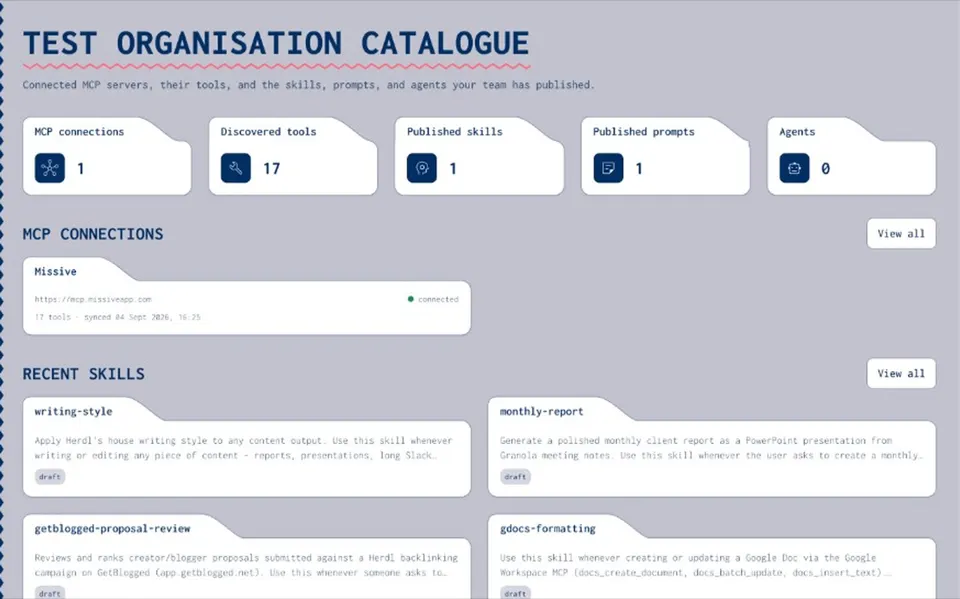
The MCP security best practices from OWASP and the Cloud Security Alliance both recommend a list of approved servers. Record the MCP servers your organisation uses in a private catalogue, instead of leaving them in personal configs and Slack screenshots.
- Clear owners
Give manage rights to the people responsible for each server. Everyone else gets view or use rights.
- Admin-controlled connections
Decide who may add servers to the catalogue, so the list reflects a decision and not whoever connected something first.
DOCUMENTED TOOLS
Read every tool before your team uses it
- Import the tool list
Joyst runs tools/list and imports every tool with its schema, so reviewers can read what the server exposes.
- Add notes
Write down when to use each tool, what to watch for and what it should never be used for.
- Re-sync and review
Sync on demand or on a schedule. Review the imported tools again when a server changes, before the wider team relies on them.
CREDENTIALS
Keep credentials out of chat and config
- OAuth where supported
Prefer servers that sign each person in with OAuth. Tokens act for one person, with approved scopes. The MCP OAuth guide explains how sign-in works.
- Static keys in the vault
Store static keys in Joyst’s encrypted vault, private by default, and refer to them by name. Never paste them into chat or commit them in mcp.json.
- Names in packages
Agent packages list MCP endpoints and the names of the secrets they need, never the tokens themselves.
RECORDS
Know what changed, and who changed it
- Sync history
Connection health and sync history show when a sync failed, instead of hiding it.
- Audit trail
Connecting, publishing or changing an item writes an audit entry, so you can see who connected, published or changed a server.
- Permissions on servers
Give groups None, View, Use & Annotate or Manage rights on each server and folder.
- Log tool calls
Joyst’s audit trail records changes to the catalogue, not individual tool calls. Log calls in your AI client or gateway and send them to your security tooling.
What a catalogue does not do
Joyst is not in the call path. Your AI tools connect to MCP servers directly, and Joyst does not proxy or inspect those calls. That means the catalogue records which servers are approved but does not stop someone connecting a server outside it, and it does not filter individual tools on a server. Enforcing an approved list at call time, and choosing which tools from a server an AI may use, is the job of an MCP gateway. Enterprise gateway controls are on the Joyst roadmap. Joyst does not scan MCP servers for vulnerabilities. Pair the catalogue with your client’s own controls, such as Cursor’s MCP allowlist for enterprise teams or Claude’s organisation connector settings.
RELATED
Keep exploring.
- MCP catalogue
Connect, document and approve MCP servers.
Open - Document MCP tools
Add notes so people and agents understand each tool.
Open - Private vs public MCP registry
How an approved list differs from a public marketplace.
Open - How to connect an MCP server
Connect and document a server step by step.
Open - MCP OAuth
How MCP OAuth sign-in works, step by step.
Open - Secrets vault
Keep MCP keys out of chat and config files.
Open - Controlled substitution
Use vault secrets by name. Designed to keep keys out of the model’s context.
Open - Catalogue vs MCP gateway
Two different jobs, and which one to start with.
Open - Permissions and audit trail
Who can see, use and change each server.
Open - AI agent security
Controls to put in place before an agent runs.
Open - MCP security best practices (spec)
The official MCP guidance on confused deputy, token passthrough and SSRF.
Open - OWASP MCP Security Cheat Sheet
OWASP’s checklist for building and using MCP servers.
Open
MCP security FAQ
It can be, with the right controls. Use servers from sources you trust, prefer OAuth, keep keys in a vault, read each tool before the team relies on it and keep an approved list with owners.
An attack where a tool’s description contains hidden instructions that the AI follows, for example to read files or send data to an attacker. Treat tool descriptions as untrusted input.
Publish an approved list so there is a clear, easy route, and use your AI clients’ admin controls to enforce it. Joyst records the approved list. It does not block connections.
Keep static keys in a vault and refer to them by name. OAuth tokens are held by each person’s AI tool. Never put either in chat or in config files committed to git.
Not in Joyst today. Choosing which tools an AI may call is gateway work, which is on our roadmap. Some AI clients offer their own tool allowlists.
No. Joyst catalogues and documents servers. Your AI tools connect to them directly.
Build your approved MCP server list.
Create an organisation account and bring skills, prompts, MCP servers, secrets and agents into one private catalogue.
- Private to your organisation
- Draft, then publish
- Limited open beta