

AI AGENT SECURITY
AI agent security starts with what agents are built from.
AI agents read untrusted content, call tools and act on real systems. Securing AI agents takes runtime defences and good build-time decisions. This guide covers the main risks, then the controls you set before an agent runs: approved parts, keys kept out of the model’s view, least privilege and an audit trail of connections, publishing and changes.
Agents act. That changes the risk.
A chatbot answers questions. An agent takes actions: it reads email, calls APIs through MCP servers, edits files and sends messages. Agentic AI security is about what happens when those actions go wrong or are steered by someone else. The main risks, as set out in the OWASP AI Agent Security Cheat Sheet: Prompt injection: instructions hidden in a web page, document, email or tool description that the agent follows. Indirect injection, through content the agent reads, is the harder case. Tool abuse and privilege escalation: an agent with broad tools and credentials can be pushed into actions nobody intended. Data exfiltration: an agent sends sensitive data to an attacker through a tool call, a link or an output. Memory poisoning: false information planted in an agent’s memory changes later decisions. High-impact actions: payments, deletions and external messages that are hard to undo. The standard defences are least privilege, scoped tools, strong identity and access control, human approval for high-impact actions, monitoring and logging, sandboxing and treating every input as untrusted. Some of those work while the agent runs. Others are decided before it runs at all.
IN PRACTICE
How attacks on agents happen
- A poisoned page
An agent summarising a web page finds hidden text telling it to email a file to an outside address. Keep the agent’s tools narrow and have a person confirm any message that leaves the organisation.
- An over-privileged agent
An agent given a broad admin key for one small job can be pushed into anything that key allows. Give each package only the MCP servers and secrets it needs, and use keys scoped to the job.
- Data sent out through a link
An agent is tricked into putting sensitive data into a URL or a tool call. Review which tools can send data out, then log and monitor those calls in your security tooling.
BUILD TIME
Start with what an agent may use
- Approved parts
Build agent packages from published skills, MCP servers in your private catalogue and approved prompts, instead of one-off connections and copied files.
- Published versions
Editing a published skill creates a new draft. The team keeps using the published version until someone with manage rights publishes the change.
- Documented tools
Every MCP server in the catalogue has its tools imported with their schemas, and your team can add notes to each one, so you know what an agent could call.
- A setup recipe, not a copy
Agents fetch a step-by-step setup from Joyst’s hosted MCP server, then connect to third-party servers themselves. Credentials are never included.
SECRETS
Keep keys out of the model’s view
- Names, not values
Agent packages list the names of the secrets they need. The values stay in the encrypted vault.
- Controlled substitution
For authorised HTTP calls, Joyst inserts the key on its own server at the moment of use. It is designed to keep the raw value out of the prompt the model sees.
- Use without reveal
People can be given use rights on a key without being able to read or change it.
PERMISSIONS
Least privilege for people and packages
- Four levels
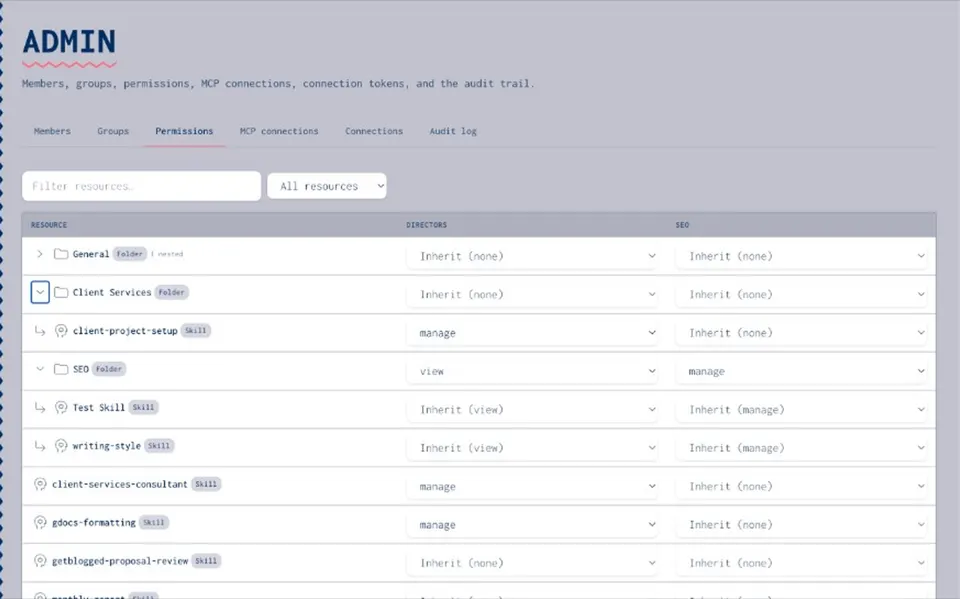
Give groups None, View, Use & Annotate or Manage rights on skills, prompts, MCP servers, agents and folders.
- Folder inheritance
Set rights on a folder once and everything inside follows.
- Who publishes
Keep manage rights, and so the power to publish an agent for the whole team, with a small group of owners.
- Scoped tokens
Each person connects to Joyst’s hosted MCP server with their own scoped token, not a shared one.
RECORDS
Know who changed what
- Audit entries
Connecting, publishing or changing an item writes an audit entry, so you can see who connected, published or changed a skill, server or package.
- Version notes
Skills and prompts keep their history with notes, and you can roll back a skill or prompt to an earlier version.
What runtime tools still need to do
Joyst works before an agent runs. It is not in the call path: agents connect to MCP servers directly, and Joyst does not monitor, log or filter their tool calls. Pair it with tools that work while the agent runs: Prompt-injection defences and output filtering from your model provider or a security vendor. Sandboxing for agents that run code or local MCP servers. Human approval for payments, deletions and messages sent outside the organisation. Most AI clients can ask before each tool call. Monitoring and logging of agent actions in your security tooling. Per-tool restrictions on MCP servers. In Joyst this gateway work is on the roadmap. Some AI clients offer their own tool allowlists today.
RELATED
Keep exploring.
- AI governance
Permissions and an audit trail across the private catalogue.
Open - Agents
Package skills, prompts, MCP servers and secret names into reusable setups.
Open - Secrets vault
Keys kept out of model context.
Open - Controlled substitution
Use vault secrets by name. Designed to keep keys out of the model’s context.
Open - MCP catalogue
Connect, document and approve MCP servers.
Open - MCP security
Risks and practical controls for MCP servers.
Open - Permissions and audit trail
Who can see, use and change each item.
Open - Catalogue vs MCP gateway
Two different jobs, and which one to start with.
Open - OWASP AI Agent Security Cheat Sheet
OWASP’s do’s and don’ts for building and running agents.
Open
AI agent security FAQ
Prompt injection, tool abuse and privilege escalation, data exfiltration, memory poisoning and high-impact actions taken without a check. OWASP’s AI Agent Security Cheat Sheet covers each one.
Keep keys in a vault and have agents refer to them by name. For authorised HTTP calls, Joyst’s controlled substitution applies the value on the server. This is designed to keep the key out of the prompt.
You can decide which catalogue servers go into an agent package and who may use it. Joyst does not block calls at run time. Enforcement at call time needs a gateway or your AI client’s own controls.
No. Joyst is not in the call path. Use your security tooling and your AI client’s logs to monitor agent actions.
A small group of owners with manage rights. Everyone else gets use rights, so they can run the agent without changing it.
Use the audit trail to see who changed what and when. Skills and prompts keep a version history, so you can restore an earlier published version of the part that changed, then check the agent package still works as expected.
Build agents from approved parts.
Create an organisation account and bring skills, prompts, MCP servers, secrets and agents into one private catalogue.
- Private to your organisation
- Draft, then publish
- Limited open beta