

CHECKLIST
MCP security best practices checklist
A short checklist for registering and documenting MCP servers: one approved list, named owners, tools you have read, keys in a vault and a review rhythm. Soft path to the fuller MCP security guide. This is guidance, not a compliance certificate.
What this checklist is for
MCP security best practices start with organisation, not with a gateway. Before you worry about filtering live calls, decide which servers the team may use, who owns each connection, and how credentials stay out of chat. Use this page as a working checklist. For the risk picture (tool poisoning, rug pulls, confused deputy and the rest), read [MCP security](/mcp-catalog/mcp-security). For the commercial catalogue of registered servers, open the [MCP catalogue](/mcp-catalog).
APPROVED LIST
Keep one approved list of servers
- Register what you allow
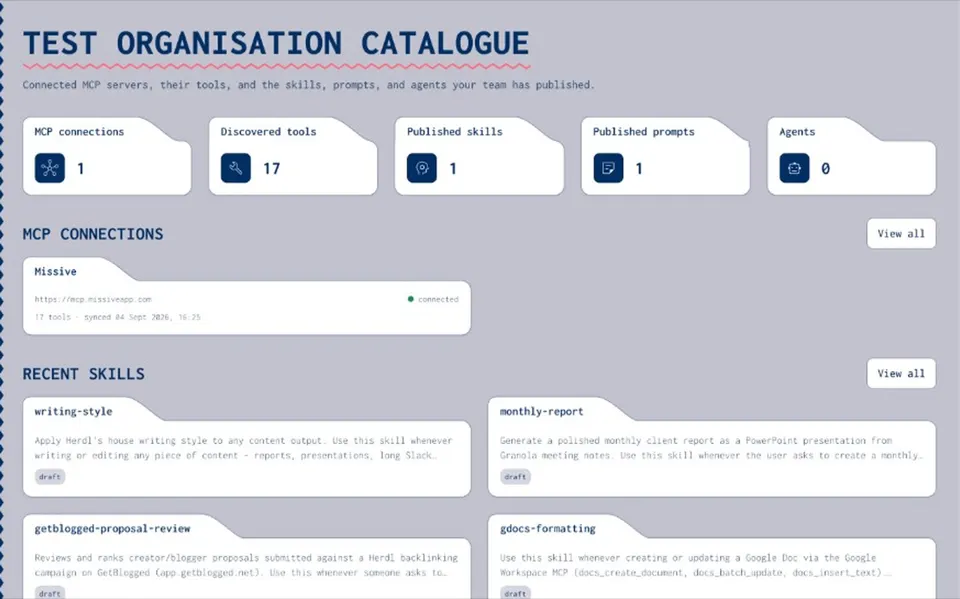
Record each MCP server the organisation uses: name, endpoint and a short note on why it is there. Prefer a private catalogue over personal configs and Slack screenshots.
- Decide who may add servers
Make adding a connection an intentional act. The list should reflect a decision, not whoever connected something first.
- Point people at the list
New starters and contractors should find the approved servers in one place, not by copying a colleague's local setup.
Name an owner for every connection
Every registered server needs someone who answers for it. Give that person Manage rights. Everyone else gets View or Use & Annotate. When the owner leaves or the server is retired, transfer or remove the connection in the same sitting. Folders help when several servers belong to one team: put them together and inherit the same group rights.
TOOLS
Import and read every tool
- Run tools/list
Import the tool names, descriptions and schemas so reviewers can see what the server exposes before the wider team relies on it.
- Treat descriptions as untrusted
The AI reads tool descriptions to decide when to call them. Those strings come from the server. Read them the way you would read untrusted web copy.
- Re-check after a change
If a server you already reviewed changes a tool's description or behaviour, review the imported list again before people keep using it.
Annotate what each tool is for
Notes turn an imported schema into something a teammate can trust. Write when to use the tool, what to watch for, and what it should never be used for. Keep examples short. Annotations sit with Use & Annotate and Manage rights, so owners and reviewers can improve them without opening full Manage to everyone.
CREDENTIALS
Keep credentials in a vault
- No keys in chat
Do not paste API keys, tokens or passwords into chats, prompts or committed mcp.json files.
- Vault by name
Store static keys in an encrypted vault and refer to them by name. Prefer substitution designed to keep values out of model context.
- OAuth where the server supports it
Prefer servers that sign each person in with OAuth. Tokens act for one person with approved scopes. See [MCP OAuth](/resources/connect-mcp-server-with-oauth).
ACCESS
Set permissions on servers and folders
- Four levels
None, View, Use & Annotate, and Manage. Most people need View or Use & Annotate. Manage stays with named owners.
- Groups and folders
Put people in groups that match teams. Use folders so related servers inherit the same rights.
- Separate use from manage
Rights to run a tool are separate from rights to change the connection or the secret behind it.
Re-sync when servers change
Sync on demand or on a schedule. Connection health and sync history show when a sync failed instead of hiding it. When tools are added, updated or removed, review the change before the wider team relies on the new list. Catalogue sync records what changed in the inventory. It does not inspect live tool calls.
Record connect, publish and change
Connecting a server, publishing a related item or changing a shared asset should leave an audit entry. That answers "who connected this" and "who changed it" later. Catalogue audit covers connect, publish and change events. It does not log every individual tool call. Log calls in your AI client or security tooling if you need that detail.
Review cadence
Pick a simple rhythm and name an owner. **Monthly (or each sprint).** Owners confirm each connection still has a purpose and useful notes. Archive what nobody uses. **Quarterly.** Review group membership and Manage rights. Confirm vault secrets still belong with the right servers. Rotate anything that was exposed. **When something changes.** A new AI client, a new MCP server or a data rule should trigger a short update to the approved list, not a full rewrite.
HONESTY
What a catalogue records, and what it does not enforce
- What it records
Which servers are registered, which tools were imported, who connected or changed an item, and who may View, Use & Annotate or Manage.
- What it does not do
It does not sit in the live path between your AI client and a third-party MCP server. It does not block someone installing an unapproved tool on their laptop. It does not detect tools used outside the catalogue.
- What the checklist should say
People agree to use the approved list and report gaps. Enforcement is social and managerial first, plus your AI clients' own admin controls. A catalogue supports the checklist; it does not replace it.
NEXT
Put the checklist next to the guide
- Work the list
Register servers, name owners, read tools, vault keys and set a review date. Tick the sections above in one sitting.
- Read the risks
Keep [MCP security](/mcp-catalog/mcp-security) for tool poisoning, rug pulls and the protocol-side controls.
- Soft path to the catalogue
When you want a private organisation catalogue of MCP servers with notes, permissions and sync, open the [MCP catalogue](/mcp-catalog).
RELATED
Keep exploring
- MCP security
Risks and practical controls for MCP servers.
Open - MCP catalogue
Connect, document and approve MCP servers.
Open - Document MCP tools
Add notes so people and agents understand each tool.
Open - How to connect an MCP server
Connect and document a server step by step.
Open - MCP OAuth
How MCP OAuth sign-in works, step by step.
Open - Secrets vault
Keep MCP keys out of chat and config files.
Open - Controlled substitution
Use vault secrets by name. Designed to keep keys out of the model's context.
Open - Permissions and audit trail
Who can see, use and change each server.
Open - Catalogue vs MCP gateway
Two different jobs, and which one to start with.
Open - MCP security best practices (spec)
The official MCP guidance on confused deputy, token passthrough and SSRF.
Open - OWASP MCP Security Cheat Sheet
OWASP's checklist for building and using MCP servers.
Open
MCP security best practices FAQ
Keep one approved list of servers, name an owner for each connection, import and read every tool, annotate what each tool is for, store keys in a vault, set clear permissions, re-sync when servers change, and review on a simple cadence.
The MCP security page covers risks and practical controls. This checklist is the day-to-day list of actions for registering and documenting servers. Soft-link both ways.
No. A private catalogue records which servers are approved and who changed them. It does not sit in the live call path or stop someone connecting a server outside it. Pair it with your AI clients' admin controls.
In a vault, referred to by name. Prefer substitution designed to keep values out of model context. Never paste keys into chat or commit them in config files.
None, View, Use & Annotate, and Manage. Most people need View or Use & Annotate. Manage stays with the owners who answer for each server.
No. Audit covers connect, publish and change events on catalogue items. Log individual tool calls in your AI client or security tooling if you need that detail.
Keep the checklist next to the catalogue
When you want a private list of MCP servers with notes, permissions and sync, open the MCP catalogue. For the risk guide, stay on MCP security.
- Guidance, not certification
- Soft link to MCP security
- Limited open beta