

SECRETS VAULT
Secrets management tools for AI agents, not just servers.
Most secrets management tools were built to hand credentials to servers and pipelines. AI agents need something else: keys they can use while the values stay out of model context, shared on purpose and named in agent setups. Joyst’s vault is designed for that job, alongside the tools you already run.
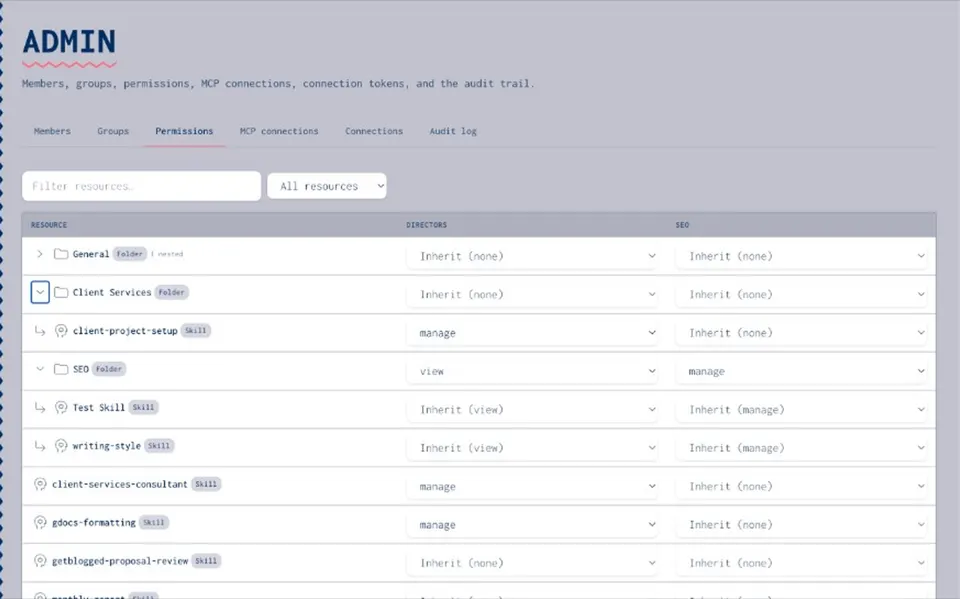
Built for servers. Now used by agents.
A secrets manager stores credentials centrally, controls who can read them and hands them to the applications that need them. HashiCorp Vault, AWS Secrets Manager, Infisical and Doppler do this well for servers, containers and CI pipelines. AI work adds places those tools were never designed to reach. People paste API keys into ChatGPT and Claude to get an agent working. Keys end up in prompts, chat history, Slack threads and agent config files. Once a key is in a prompt, it is in the model’s context, where it can be logged and repeated back. For AI agents, the job is narrower. An agent should be able to use a key without the key appearing in the conversation, and people should be able to use a shared key without being able to read it.
What to look for in secrets management tools
The usual criteria, and where each one is best handled: Encryption at rest: essential for any tool. Joyst encrypts vault entries at rest. Access control: who can read, use and change each secret. Joyst separates use from manage rights, so people can use a key without seeing its value. Audit logs: a record of changes. Joyst’s audit trail records who connected, published or changed what. Logging of each individual use is not something Joyst describes today. Automatic rotation: a core feature of infrastructure tools. In Joyst you replace a value by hand. There is no scheduled rotation. Dynamic or short-lived secrets: an infrastructure feature for databases and cloud roles. Not offered by Joyst. Leak scanning: dedicated scanners watch repositories and chats for exposed keys. Joyst does not scan for leaked keys. Integrations: infrastructure tools plug into Kubernetes, CI and cloud platforms. Joyst does not sync with Vault or AWS. The extra criteria for AI agents: Kept out of model context: can an agent use the key without the value entering the prompt? Referenced by name: can agent setups carry the secret’s name instead of its value? Use without reveal: can a teammate use a shared key without being able to read it?
Which secrets management tool for which job
Secrets management solutions fall into a few groups. Cross-platform vaults, such as HashiCorp Vault, its open-source fork OpenBao and Akeyless, hold secrets for many platforms in one place and can issue short-lived credentials. Cloud-native services, such as AWS Secrets Manager, Azure Key Vault and Google Secret Manager, are the simplest choice when your workloads live in one cloud. Developer-focused secret management tools, such as Infisical and Doppler, sync environment variables into apps and CI pipelines. On Kubernetes, the External Secrets Operator pulls secrets from any of these into your clusters. All of these were built for applications and infrastructure. Joyst covers the keys people and agents use inside AI tools, and runs alongside whichever of them you already use.
Infrastructure secrets vs agent credentials
Infrastructure secrets managers (Vault, AWS Secrets Manager, Infisical, Doppler) Built for: servers, containers, CI pipelines and cloud workloads. Typical secrets: database passwords, cloud roles, service certificates. Delivered to: applications, at deploy time or at start-up. Strengths: rotation, dynamic secrets, deep platform integrations. A vault for AI workflows (Joyst) Built for: people and AI agents working in ChatGPT, Claude, Cursor and similar tools. Typical secrets: SaaS API keys and tokens that agents and MCP tools use. Delivered to: authorised calls, with the value applied on Joyst’s server. Strengths: keys referenced by name, kept out of model context, tied to agent packages and team permissions. Joyst is not built for infrastructure secrets. Keep those in your infrastructure secrets manager.
How controlled substitution keeps keys out of context
Controlled substitution means the agent refers to a secret by name and Joyst inserts the real value on its own server at the moment of use. For an authorised HTTP call, the agent sends the request with a placeholder where the key belongs. Joyst checks the caller may use that secret, applies the value and returns the response, never the key. It is designed so the raw value does not appear in the prompt the model sees. Where substitution is available can change between releases.
SECRETS SPRAWL
End secrets sprawl in prompts, Slack and agent configs
- One home for AI keys
Store the keys your AI tools and agents use in one encrypted vault, private by default.
- Share on purpose
Share a key with the organisation only when everyone should use it. Joyst shows a clear warning before you do.
- Names, not values
Agent packages list the names of the secrets they need. The values never travel with the package.
- Replace leaked keys
If a key has been pasted into chat, rotate it with the provider, store the new value in the vault and refer to it by name from then on.
ALONGSIDE
Use it alongside Vault or AWS Secrets Manager
- Keep your infrastructure tool
Vault, AWS Secrets Manager and similar tools stay in charge of infrastructure secrets, rotation and deployment.
- Add a vault for AI work
Use Joyst for the keys people and agents use in AI tools, where the risk is a key landing in a prompt.
- Separate by job
If a credential belongs to a server or pipeline, it stays in infrastructure. If an agent or teammate uses it in an AI tool, it belongs in Joyst.
RELATED
Keep exploring.
- Secrets vault
Keys kept out of model context.
Open - Controlled substitution
Use vault secrets by name. Designed to keep keys out of the model’s context.
Open - Add and use secrets
Store keys in the vault and refer to them safely.
Open - Stop pasting API keys
Why pasting keys into AI chat fails audits.
Open - Permissions and audit trail
Who can see, use and change each secret.
Open - Agents
Package skills, MCP servers and secret names into reusable setups.
Open - MCP catalogue
The MCP servers your team uses. Static keys for them belong in the vault.
Open - AI agent security
Controls to put in place before an agent runs.
Open
Secrets management tools FAQ
Yes, for infrastructure secrets. Joyst does not replace them. It covers the keys people and agents use in AI tools.
Store the key in the vault and have the agent refer to it by name. For authorised HTTP calls, controlled substitution applies the value on Joyst’s server.
Controlled substitution is designed so it cannot. The value is applied on the server and the call returns the response, not the key.
Anyone you give use rights to. Use rights let people run an agent that needs a key. Manage rights control who can change or share it.
Treat the key as exposed. Rotate it with the provider, store the new value in the vault and refer to it by name from then on.
Static keys for MCP servers belong in a vault, not in chat or committed config files. OAuth sign-ins are held by each person’s AI tool.
Keep AI keys in the vault, not in the prompt.
Create an organisation account and bring skills, prompts, MCP servers, secrets and agents into one private catalogue.
- Private to your organisation
- Draft, then publish
- Limited open beta