

TEMPLATE
AI usage policy template for teams
A short AI usage policy tells people which skills, prompts, MCP servers, secrets and agents they may use, who owns each item, and how credentials stay out of chat. Copy the sections below and adapt them. This is guidance, not legal advice or a compliance certificate.
What an AI usage policy is for
An AI usage policy is the short set of rules your organisation agrees for everyday AI work. It sits beside longer frameworks and security standards. Its job is practical: which tools people may use, how shared assets are published, how keys are handled, and who to ask when something is unclear. Keep it short enough that people will read it. Point to your catalogue of approved items rather than listing every tool in the policy itself. For the wider orientation picture, see the [AI governance framework](/resources/ai-governance-framework) and the longer read on [governing skills, prompts and secrets](/blog/governing-skills-prompts-and-secrets).
SCOPE
Decide what the policy covers
- AI tools and clients
Name the chat and coding tools people may use for work (for example Claude, Cursor, ChatGPT). Say what needs a request before someone adds a new client.
- Data and clients
Say what data may go into prompts, what must stay out, and any rules for client or customer information. Keep this plain; leave detailed data classification to your security policy.
- Shared building blocks
Cover skills, prompts, MCP servers, secrets and agent packages that the team shares. Personal experiments stay private until someone publishes them for others.
- What it does not cover
Model risk frameworks, vendor due diligence and legal compliance sit elsewhere. This template does not claim ISO, NIST or EU AI Act compliance.
Approved assets: skills, prompts, MCP servers, secrets and agents
Write a rule that people use the organisation's approved list when one exists, rather than copying a colleague's private setup. **Skills and prompts.** Shared wording and instructions live as draft or published versions. Only published items are the ones the team should copy. **MCP servers.** Register the servers the organisation allows, with notes on what each tool does and who looks after the connection. People still connect those servers in their own AI client. **Secrets.** Store credentials in a vault and refer to them by name. Do not paste API keys into chats, prompts or committed config. **Agents.** Packages that bundle published skills, catalogue MCP endpoints and secret names. Build them from items people already have permission to use. In a private catalogue, that approved list is the inventory of what your teams register. It does not scan for tools used outside the catalogue.
ACCESS
How people get access
- Groups and folders
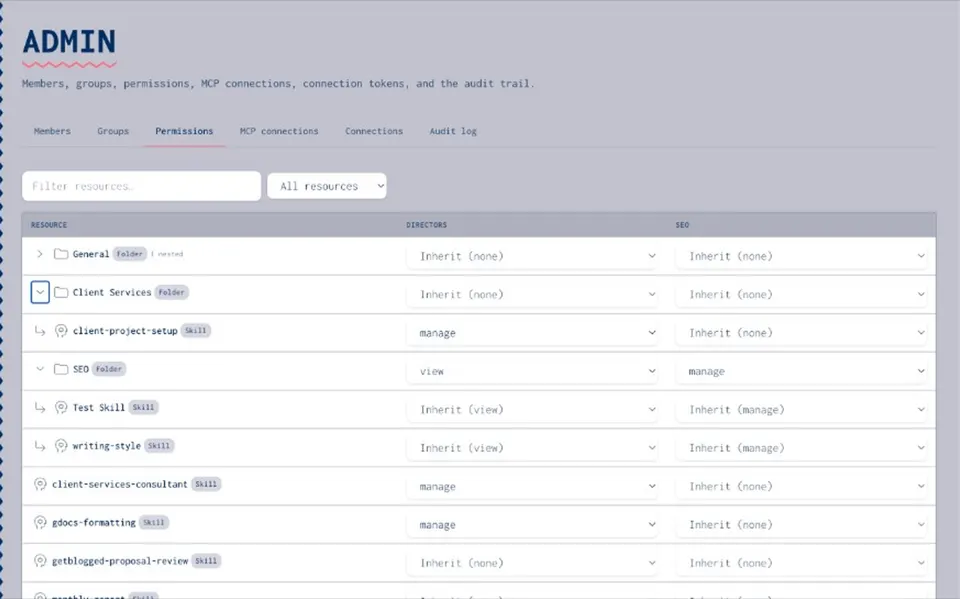
Put people in groups that match teams or roles. Use folders so related items inherit the same rights.
- Permission levels
Four levels keep ownership clear: None, View, Use & Annotate, and Manage. Most people need View or Use & Annotate. Manage stays with the owners who publish and answer for an item.
- Private, group or organisation
Keep work private while drafting. Share with a group when ready for peers. Publish to the organisation when it is the approved version.
- New starters
Invite them, add them to the right groups, and show them the approved catalogue in the first week. They should not need to hunt in chat history for the "real" prompts.
Secrets and credentials
Paste this into your policy almost as written, then add any local rules. 1. Do not paste API keys, tokens or passwords into AI chats, prompts, skills or tickets. 2. Store work credentials in the organisation vault. Refer to them by name in setups and agent packages. 3. Prefer server-side substitution so the model never sees the secret value in context. 4. If a key appears in chat history or a shared doc, rotate it and record that you did. 5. Use rights to run a tool are separate from manage rights to change the secret itself. Joyst's vault is private by default, with optional organisation sharing. Controlled substitution is designed to apply the value on the server at the moment of use, and not return it to the model.
HONESTY
What a catalogue records, and what it does not enforce
- What it records
Who connected an MCP server, who published a skill or prompt, and who changed an item. That audit trail answers "what happened" later.
- What it does not do
It does not sit in the live path between your AI client and a third-party MCP server. It does not block someone installing an unapproved tool on their laptop. It does not detect "shadow AI" in use outside the catalogue.
- What the policy should say
People agree to use the approved list and report gaps. Enforcement is social and managerial first. A catalogue supports the policy; it does not replace it.
Review cadence
Pick a simple rhythm and name an owner. **Monthly (or each sprint).** Owners check that published skills and prompts still match how the team works. Remove or archive what nobody uses. **Quarterly.** Review group membership and Manage rights. Confirm MCP connections still have an owner and useful notes. Rotate any secrets that have been exposed or are past your internal age limit. **When something changes.** A new AI client, a new MCP server or a client data rule should trigger a short policy note and a catalogue update, not a rewrite of the whole document.
Copy-ready AI usage policy template
Replace the brackets with your organisation's details. Keep the tone direct. **1. Purpose** This policy sets out how [Organisation] uses AI tools at work: which clients we allow, which shared skills, prompts, MCP servers, secrets and agents people should use, and how we handle credentials. **2. Allowed AI clients** People may use [list: e.g. Claude, Cursor, ChatGPT] for work. Adding a new client needs agreement from [role]. **3. Approved building blocks** Use the items published in our private catalogue. Draft and personal copies stay private until an owner publishes them. Do not treat a colleague's unpublished setup as company standard. **4. Access** Access is by group. Rights are None, View, Use & Annotate, or Manage. Manage sits with named owners. Everyone else uses the published version. **5. Secrets** No keys in chat. Store credentials in the vault and refer to them by name. If a key leaks into a prompt or thread, rotate it and tell [role]. **6. MCP servers** Connect only servers registered for our organisation, unless [role] agrees otherwise. Document what each connection is for. **7. Data** Do not put [forbidden data types] into prompts. Follow the data rules in [link to security / privacy policy]. **8. Records** Connecting, publishing and changing shared items should leave an audit entry. Owners review access on the schedule in section 9. **9. Review** [Role] reviews this policy and catalogue ownership every [quarter]. Teams raise gaps through [channel]. **10. What this policy is not** It is everyday guidance for tools we use. It is not a claim of certification against ISO, NIST, the EU AI Act or any other standard.
NEXT
Put the policy next to the catalogue
- Write the short version
Agree the ten sections above in one sitting. Link out for legal and security detail.
- Point at real items
Your policy should name the catalogue, not invent a second list in a wiki that goes stale.
- Soft path to governance
When you want permissions and audit across the private catalogue, open [AI governance](/ai-governance). The [framework guide](/resources/ai-governance-framework) stays the orientation checklist.
RELATED
Keep exploring.
- AI governance
Permissions and an audit trail across the private catalogue.
Open - AI governance framework
Practical controls for everyday AI tools, with a checklist.
Open - Governing skills, prompts and secrets
How to write a usage policy that people follow.
Open - Sharing and permissions
Private, group and organisation sharing, explained.
Open - Permissions and audit trail
Who can see, use and change each item.
Open - Secrets vault
Keys kept out of model context.
Open - Audit trail how-to
Read the record of who changed what.
Open - AI inventory
Record the skills, prompts, MCP servers and agents teams register.
Open
AI usage policy FAQ
Allowed AI clients, approved skills and prompts, MCP servers, how secrets are stored, who has manage rights, data rules, a review cadence, and a clear note that it is workplace guidance rather than a compliance certificate.
Short enough to read in a few minutes. Put detail in the catalogue and in security or privacy policies. Ten short sections are enough for most teams.
A named owner, often in platform, security or operations, with a champion in each team. Individual catalogue items still need their own owners with manage rights.
Groups get None, View, Use & Annotate or Manage on items and folders. That matches the policy rule that most people use published items while owners publish and maintain them.
No. A private catalogue records approved items and who changed them. It does not block installs in personal AI clients or detect tools used outside the catalogue. The policy still relies on people following it.
No. Those frameworks and laws need their own programmes. This template covers everyday skills, prompts, MCP servers, secrets and agents. Use your chosen framework for the rest.
Keep the policy next to the catalogue
When you are ready for permissions and an audit trail across skills, prompts, MCP servers, secrets and agents, open AI governance.
- Guidance, not certification
- Soft link to governance
- Limited open beta