

WHAT-IS
What is an MCP server?
MCP is the Model Context Protocol: a shared way for AI tools to discover and call external tools. An MCP server is the programme that exposes those tools. This page explains both, with real remote examples, then points to where a private catalogue fits.
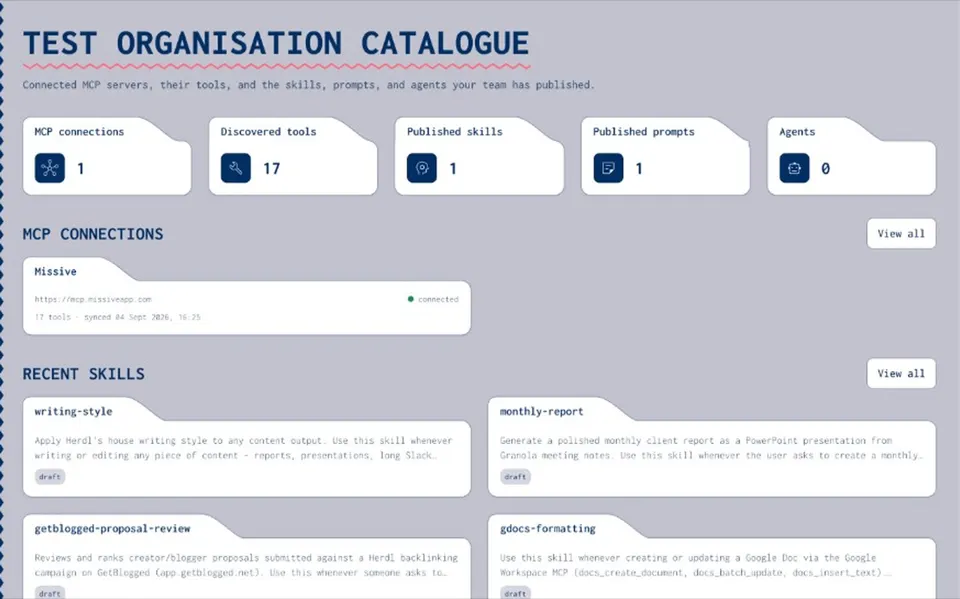
What is MCP?
MCP stands for Model Context Protocol. It is an open standard that lets an AI client (Claude, Cursor, Codex CLI and others) talk to an external server that offers tools, resources and prompts. Without a shared protocol, every AI tool invents its own way to plug into Google Sheets, a CRM or an SEO API. MCP gives clients and servers one vocabulary: list what you can do, then call it when asked. The official documentation lives at [modelcontextprotocol.io](https://modelcontextprotocol.io).
What is an MCP server?
An MCP server is the programme that implements those tools. When a client connects, the server advertises a tool list (names, descriptions and input schemas). When the client asks to run a tool, the server does the work and returns the result. Think of the client as the AI app you chat in, and the server as the specialist that actually reads a spreadsheet, queries SE Ranking or lists Google Ads accounts. The protocol is the shared language between them.
CLARITY
What an MCP server is not
- Not the AI model
The model reasons. The MCP server runs tools and returns data.
- Not your chat UI
Claude, Cursor and similar apps are clients. They connect to servers.
- Not an app store by itself
A server exposes tools. A public directory or marketplace is a separate discovery layer.
- Not a live gateway
A gateway would sit in the call path and filter traffic. That is a different product job from a catalogue of registered servers.
IN ONE MINUTE
Local vs remote MCP servers
- Local (stdio)
Your AI tool starts the server as a process on your machine and talks over standard input and output. Useful for files and tools that must stay on the laptop.
- Remote (HTTP)
The server runs at a URL, often ending in /mcp. Clients connect over HTTPS, usually with OAuth or a header. Useful for SaaS tools the whole team shares.
- Setup guides
Client setup for Claude, Cursor and VS Code lives on the remote MCP server how-to. This page stays on definitions.
Real examples of remote MCP servers
These are public Herdl-built remote servers. They show the pattern: an HTTP MCP endpoint, a named tool list, and OAuth so credentials stay with the server rather than in the model. **[google-sheets-remote-mcp](https://github.com/garethmorgans/google-sheets-remote-mcp)** : Cloudflare Workers remote server with an MCP endpoint at `/mcp`. Claude-native OAuth. Tools for Google Sheets, Docs, Slides and Drive. Clients can also reach it through `mcp-remote` with the worker URL. **[se-ranking-remote-mcp](https://github.com/garethmorgans/se-ranking-remote-mcp)** : Workers MCP for SE Ranking APIs. OAuth routes include `/authorize`, `/token`, `/register` and `/callback`, with a protected `/mcp`. Tools cover keyword research and domain analysis. Default email allowlist is `herdl.com`. **[google-ads-remote-mcp](https://github.com/garethmorgans/google-ads-remote-mcp)** : Read-only Google Ads MCC workflow over remote MCP. OAuth plus an optional `@herdl.com` allowlist. Discovery tools such as `list_accessible_customers` and `list_customer_clients`, plus reporting presets. No mutate calls. In each case the server lists tools with schemas, the client discovers them, and sign-in stays on the server side.
Why teams catalogue MCP servers
Once people connect different servers in Claude, Cursor and elsewhere, you need a shared record of what the organisation allows: which servers, who owns them, and what each tool is for. A private MCP catalogue registers those servers, imports their tool lists, and keeps notes with permissions. Joyst does that for organisations. Live tool calls still go from your AI client to the third-party server; Joyst is not in that path today. For the service page, see the [private MCP catalogue](/mcp-catalog).
RELATED
Keep exploring.
- Private MCP catalogue
Connect, document and approve the servers your organisation uses.
Open - Connect a remote MCP server
How to add a remote server in Claude, Cursor and VS Code.
Open - MCP OAuth
How MCP sign-in works, step by step.
Open - How to connect an MCP server
Register, import tools and annotate them for the team.
Open - MCP security
Risks worth knowing, and the controls that help.
Open - Resources hub
Practical guides for the private catalogue.
Open
MCP server FAQ
MCP is the Model Context Protocol, an open standard for AI clients to discover and call tools, resources and prompts on an external server. See modelcontextprotocol.io for the official docs.
It is the programme that exposes a tool list and runs those tools when a client asks. The AI app is the client; the server does the work.
Related, but not the same. An API is a general interface. MCP is a specific protocol so AI clients can list tools with schemas and call them in a consistent way.
A local server runs as a process on your machine (stdio). A remote server runs at a URL over HTTPS and is often shared across the team. See the remote MCP server guide for setup.
No. Chat and built-in features work without one. You add MCP servers when you want the AI to use external tools you choose, such as Sheets or an SEO API.
The servers still run elsewhere. A private catalogue records which ones your organisation registers, imports their tools and keeps notes and permissions in one place. Joyst's catalogue is that layer; it does not proxy live third-party tool calls today.
Put your organisation's servers on one list
A private MCP catalogue records the servers you register and the tools they expose. Open the catalogue when you are ready to manage them as a team.
- Definitions first
- Private catalogue next
- Limited open beta