

TEMPLATE
AI governance policy template
An AI governance policy sets out who decides, what the organisation records, and which controls apply to skills, prompts, MCP servers, secrets and agents. Copy the sections below and adapt them. This is guidance, not legal advice or a compliance certificate.
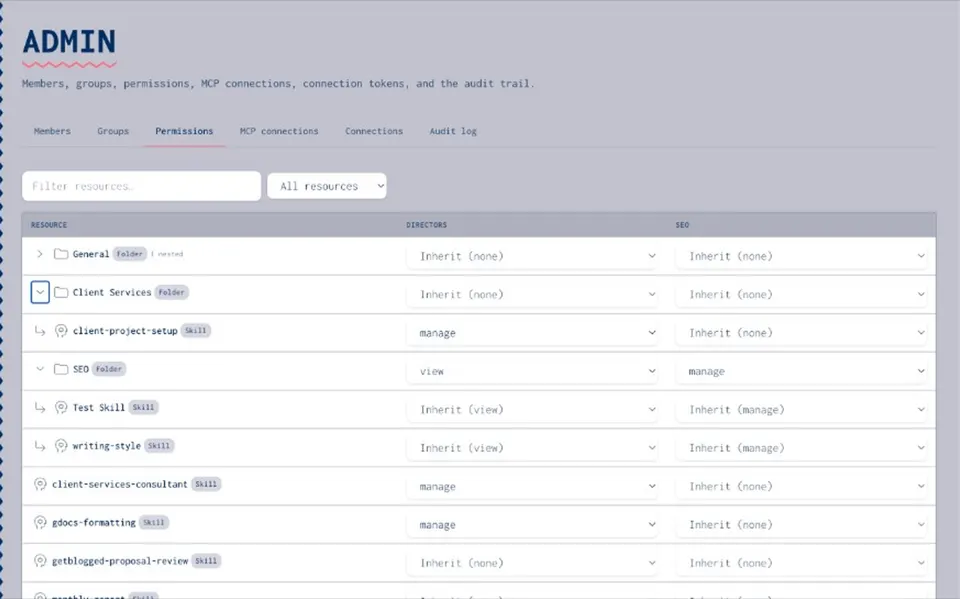
What an AI governance policy is for
An AI governance policy is the short organisational document that names accountability and the controls you expect for AI at work. It sits above day-to-day usage rules and beside longer frameworks. Use it to answer: who owns AI decisions, what must be inventoried, how access and publishing work, how credentials are handled, and how often you review. Keep the [AI usage policy template](/resources/ai-usage-policy-template) for everyday client and asset rules. Keep the [AI governance framework](/resources/ai-governance-framework) for the orientation checklist and how the controls fit together.
SCOPE
Decide what the policy covers
- People and roles
Name the sponsor, the group that writes the policy, and the owners who answer for shared skills, prompts, MCP servers, secrets and agents.
- Shared building blocks
Cover the catalogue of skills, prompts, MCP servers, secrets and agent packages. Personal experiments stay private until someone publishes them for others.
- Controls you will run
Access rights, draft-to-publish, vault rules for credentials, and an audit trail of connect, publish and change actions.
- What it does not cover
Model risk frameworks, vendor due diligence and legal compliance sit elsewhere. This template does not claim ISO, NIST or EU AI Act compliance.
Roles and accountability
Write roles in plain language. **Executive sponsor.** Owns the outcome and backs the policy when teams need a decision. **Policy owners.** Usually platform, security or operations. They keep the document current and name review dates. **Item owners.** People with Manage rights on a skill, prompt, MCP connection, secret or agent package. They publish, answer questions and retire what nobody uses. **Everyone else.** View or Use & Annotate on published items. They follow the approved list and raise gaps through the named channel. In a small organisation one person may hold several roles. Every shared item still needs someone who answers for it.
Inventory and approved assets
State that the organisation keeps one inventory of the skills, prompts, MCP servers, secrets and agents teams register. Point the policy at that catalogue rather than maintaining a second list in a wiki. **Skills and prompts.** Draft, then publish. Only published versions are the company standard. **MCP servers.** Register allowed servers with notes and an owner. People still connect those servers in their own AI client. The catalogue does not proxy live tool calls. **Secrets.** Store credentials in a vault and refer to them by name. Do not paste keys into chats, prompts or committed config. **Agents.** Packages built from published skills, catalogue MCP endpoints and secret names that people already have permission to use. The inventory is what teams register. It does not scan or detect tools used outside the catalogue.
CONTROLS
Access, publish, secrets and records
- Permission levels
Four levels: None, View, Use & Annotate, and Manage. Most people need View or Use & Annotate. Manage stays with named owners. See also [sharing and permissions](/resources/sharing-and-permissions).
- Publish on purpose
Shared skills and prompts start as drafts. Changes reach the team when an owner publishes. Prefer version history and rollback where the product supports them.
- Secrets out of chat
Vault by default. Prefer server-side substitution so secret values stay out of model context. Rotate if a key appears in a thread or shared doc.
- Audit trail
Connecting a server, publishing an item or changing a shared asset should leave a record. That answers "what happened" later.
HONESTY
What a catalogue records, and what it does not enforce
- What it records
Who connected an MCP server, who published a skill or prompt, and who changed an item. Permissions show who may View, Use & Annotate or Manage.
- What it does not do
It does not sit in the live path between your AI client and a third-party MCP server. It does not block someone installing an unapproved tool on their laptop. It does not detect tools used outside the catalogue.
- What the policy should say
People agree to use the approved list and report gaps. Enforcement is social and managerial first. A catalogue supports the policy; it does not replace it.
Review cadence
Pick a simple rhythm and name an owner. **Monthly (or each sprint).** Item owners check that published skills and prompts still match how the team works. Archive what nobody uses. **Quarterly.** Review group membership and Manage rights. Confirm MCP connections still have an owner and useful notes. Rotate secrets that were exposed or are past your internal age limit. **When something changes.** A new AI client, a new MCP server or a data rule should trigger a short policy note and a catalogue update, not a full rewrite.
Copy-ready AI governance policy template
Replace the brackets with your organisation's details. Keep the tone direct. **1. Purpose** This policy sets out how [Organisation] governs AI at work: who is accountable, what we record in our inventory, and which controls apply to shared skills, prompts, MCP servers, secrets and agents. **2. Scope** It covers AI clients used for work and the shared building blocks in our private catalogue. Detailed data classification and legal compliance sit in [link to security / privacy / risk policies]. **3. Roles** [Sponsor role] owns the outcome. [Policy owner role] keeps this document current. Named item owners hold Manage rights on catalogue items. Everyone else uses published versions under View or Use & Annotate. **4. Inventory** We keep one inventory of skills, prompts, MCP servers, secrets and agents that teams register. The catalogue is the source of truth. We do not treat detection of tools outside the catalogue as part of this policy. **5. Access** Access is by group. Rights are None, View, Use & Annotate, or Manage. Folders may inherit rights. New starters join the right groups in their first week. **6. Publishing** Shared skills and prompts move from draft to published under an owner. Unpublished setups are not company standard. **7. Secrets** No keys in chat. Store credentials in the vault and refer to them by name. Prefer substitution that keeps values out of model context. If a key leaks, rotate it and tell [role]. **8. MCP servers** Connect only servers registered for our organisation unless [role] agrees otherwise. Document what each connection is for. Live tool calls stay between the AI client and the server. **9. Records** Connecting, publishing and changing shared items should leave an audit entry. Owners review access on the schedule in section 10. **10. Review** [Role] reviews this policy and catalogue ownership every [quarter]. Teams raise gaps through [channel]. **11. Related documents** Day-to-day client and asset rules live in the AI usage policy. The orientation checklist lives in the AI governance framework guide. **12. What this policy is not** It is workplace guidance for the tools we use. It is not a claim of certification against ISO, NIST, the EU AI Act or any other standard.
NEXT
Put the policy next to the framework
- Write the short version
Agree the twelve sections above in one sitting. Link out for legal and security detail.
- Pair with usage rules
Keep everyday client and asset rules in the [AI usage policy template](/resources/ai-usage-policy-template). Do not merge both into one long document.
- Soft path to the product
When you want permissions and audit across the private catalogue, open [AI governance](/ai-governance). The [framework guide](/resources/ai-governance-framework) stays the orientation checklist.
RELATED
Keep exploring
- AI governance
Permissions and an audit trail across the private catalogue.
Open - AI governance framework
Practical controls for everyday AI tools, with a checklist.
Open - AI usage policy template
Day-to-day rules for clients, assets and secrets.
Open - Governing skills, prompts and secrets
How to write policy that people follow.
Open - Sharing and permissions
Private, group and organisation sharing, explained.
Open - Permissions and audit trail
Who can see, use and change each item.
Open - AI inventory
Record the skills, prompts, MCP servers and agents teams register.
Open - Audit trail how-to
Read the record of who changed what.
Open - Secrets vault
Keys kept out of model context.
Open
AI governance policy FAQ
Purpose, scope, roles, an inventory principle, access rights, publishing rules, secrets handling, MCP server rules, audit expectations, a review cadence, links to related documents, and a clear note that it is workplace guidance rather than a compliance certificate.
The governance policy names accountability and organisational controls. The usage policy covers everyday rules: which AI clients people may use, which published assets to prefer, and how to handle keys in daily work. Keep both short and link them.
A framework explains the parts and the practical controls. The policy is the organisation's agreed document. Use the framework guide as orientation; put the decisions into this policy template.
A named owner, often in platform, security or operations, with an executive sponsor. Individual catalogue items still need their own owners with Manage rights.
No. A private catalogue records approved items and who changed them. It does not block installs in personal AI clients or detect tools used outside the catalogue. The policy still relies on people following it.
No. Those frameworks and laws need their own programmes. This template covers everyday skills, prompts, MCP servers, secrets and agents. Use your chosen framework for the rest.
Keep the policy next to the catalogue
When you are ready for permissions and an audit trail across skills, prompts, MCP servers, secrets and agents, open AI governance.
- Guidance, not certification
- Soft link to governance
- Limited open beta